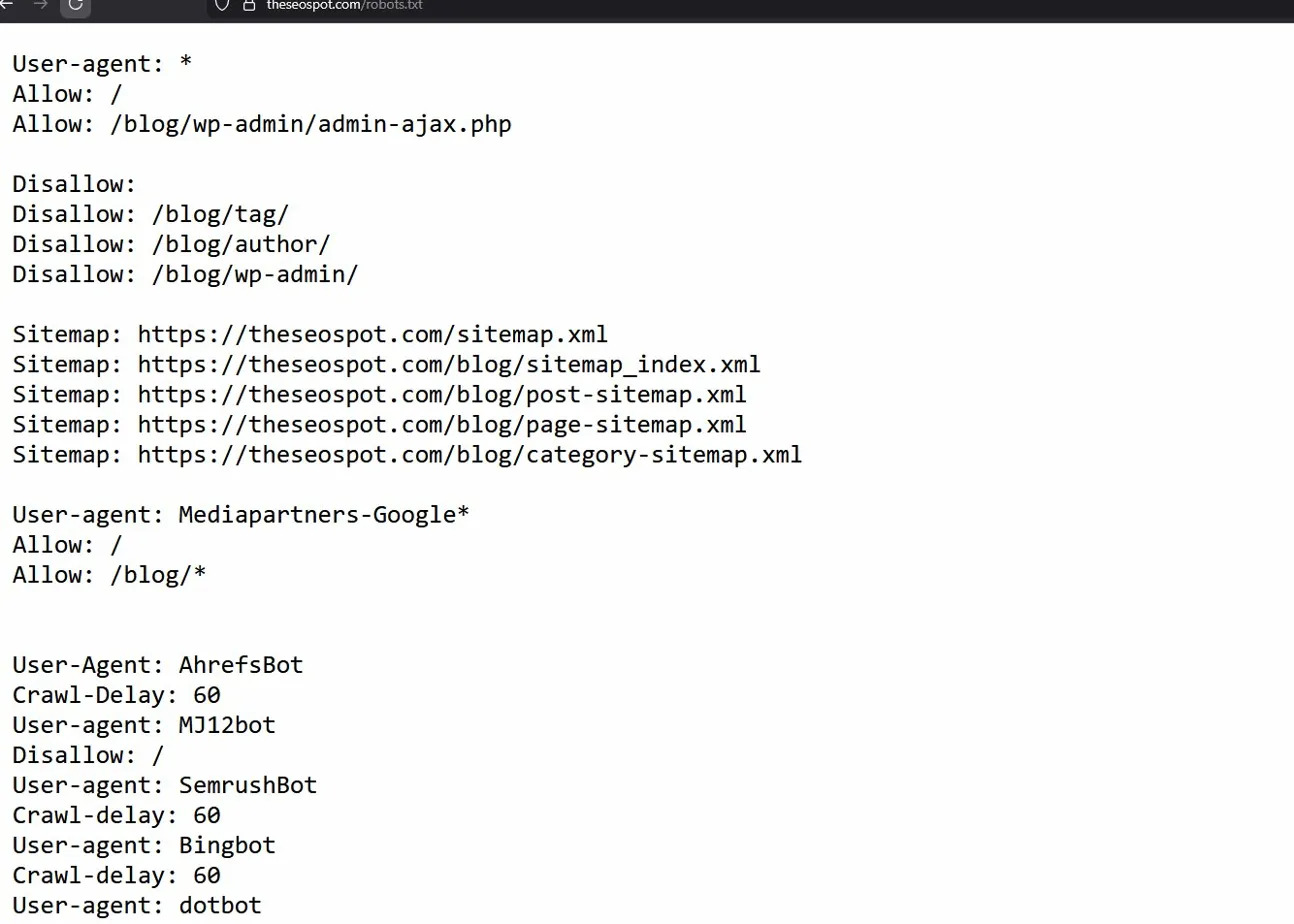
Search engine de-indexing used to be straightforward. Add a noindex tag or block something in robots.txt, and search engines would comply within a few weeks. That was before AI crawlers showed up and changed the rules.
- What De-Indexing Actually Means
- Setting Up Proper Indexing Before You Block Anything
- Why Robots.txt Doesn’t Do What Most People Think
- Noindex Is Stronger But Not Absolute
- The 403 Forbidden Nuclear Option
- AI Bots Ignore Most Traditional Blocking Methods
- Common AI Bots and Their Behavior
- Why AI Bots Bypass Traditional Controls
- What Actually Works Against AI Crawlers
- Cloudflare Bot Protection: The Most Effective Defense
- Why Cloudflare Works Where Robots.txt Fails
- Cloudflare Bot Protection Features
- Setting Up Basic Bot Blocking in Cloudflare
- Why This Matters More Than Ever
- Google’s Removal Tool and What It Can’t Do
- What Actually Works: A Layered Approach for 2026
- FAQ: Common De-Indexing Questions
- Final Thoughts
Today, managing what gets indexed involves not just Google and Bing, but dozens of AI bots training language models, scraping content for chatbot answers, and ignoring the polite requests that worked for decades. The tools haven’t changed much, but how they’re used—and what they can actually prevent—has shifted significantly.
Let’s move.
What De-Indexing Actually Means
De-indexing removes a page from a search engine’s index—the database of pages that can appear in search results. If a page isn’t indexed, it won’t rank or show up when someone searches.
This is different from deleting a page or putting it behind a login. A page can exist publicly on the web and still be de-indexed if search engines are instructed not to include it.
De-indexing typically happens in three ways:
- A site owner adds a noindex directive
- A page becomes unreachable or returns an error code
- A search engine removes it due to policy violations or legal requests
Only the first method gives you direct control. Understanding when to use noindex versus other blocking methods matters because picking the wrong tool can delay removal or leave content partially visible.
Setting Up Proper Indexing Before You Block Anything
Before worrying about what to block, make sure the pages you want indexed aren’t accidentally blocked. This sounds obvious, but it’s one of the most common mistakes in SEO cleanup work.
Important directories must not be in robots.txt. If your site’s main content, product pages, or blog posts are blocked from crawling, Google can’t index them properly—even if you want them to rank.
Here’s a basic robots.txt file for a WordPress site that allows indexing of important content:
User-agent: *
Disallow: /wp-admin/
Disallow: /wp-includes/
Disallow: /wp-content/plugins/
Disallow: /wp-content/themes/
Allow: /wp-content/uploads/

Sitemap: https://theseospot.com/blog/sitemap_index.xml
This blocks backend directories and plugins from being crawled while allowing posts, pages, and media files. The sitemap line helps search engines find your important content faster.
Common directories that should NOT be blocked if you want them to rank:
/blog//products//services//category/- Any content meant for public discovery
Getting the basics right—allowing crawling of indexable content—makes everything else in this guide actually work.
Why Robots.txt Doesn’t Do What Most People Think
Robots.txt is one of the most misunderstood tools in SEO. People assume it controls what gets indexed. It doesn’t. It controls what gets crawled.
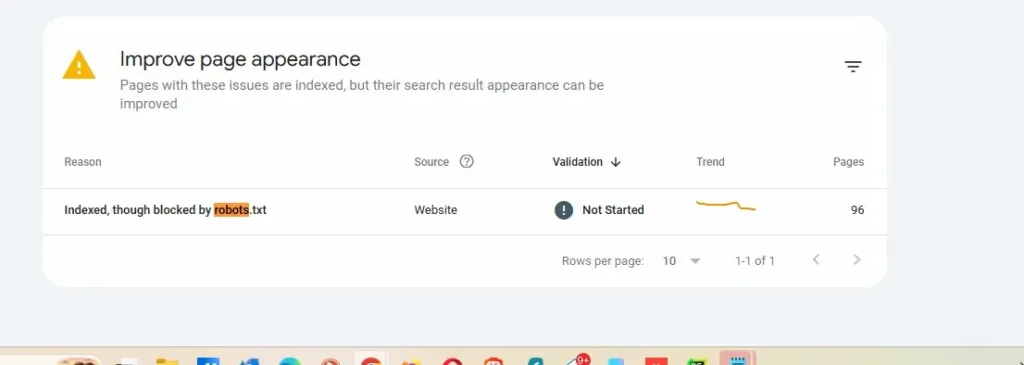
This screenshot from Google Search Console shows 96 pages that are indexed in Google despite being blocked by robots.txt. This isn’t a bug. This is how the system works.
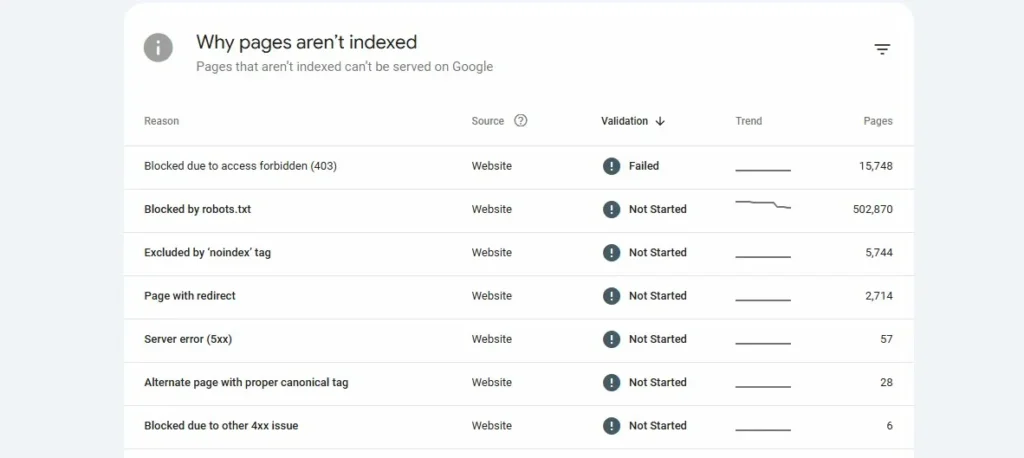
Another site has over 502,000 pages blocked by robots.txt. Some of these are still appearing in Google’s index with partial information because Google found links to them from other sites, even though it couldn’t crawl the content.
My opinion and web dynamics these days: robots.txt is advisory, not a command. It’s often described as a “gentleman’s agreement” because complying with it is voluntary. Google and Bing usually respect it, but they’re not required to.
More importantly, if a URL is blocked by robots.txt but Google discovers it through external links, Google may still index that URL—they just won’t have information about what’s on the page. The result? A search listing that shows the URL with no description, which looks unprofessional and still exposes the page exists.
Robots.txt is useful for:
- Managing crawl budget on large sites
- Blocking low-value sections like admin panels or search result pages
- Preventing duplicate content from being crawled
- Controlling access to staging or development environments
Robots.txt is the wrong choice for:
- Removing pages from search results
- Hiding content you don’t want discovered
- Urgent reputation cleanup
If the goal is removal from search results, noindex is the better option.
Noindex Is Stronger But Not Absolute
A noindex directive is an instruction in a page’s HTML that tells search engines not to index that page. Unlike robots.txt, which only controls crawling, noindex directly tells search engines “don’t include this in your index.”
There are two main ways to implement noindex:
Meta tag in HTML:
html
<meta name="robots" content="noindex, follow">HTTP header (works for PDFs, images, non-HTML files):
X-Robots-Tag: noindexThe “follow” part means search engines can still follow links on the page to discover other content. If you want to block link following too, use:
html
<meta name="robots" content="noindex, nofollow">Noindex is an obligation, not a request. When Google or Bing crawls a page with a noindex tag, they’re required to remove it from their index. This makes it far more reliable than robots.txt for de-indexing.
But there’s a catch: Search engines need to crawl the page to see the noindex directive. If you’ve blocked the page with robots.txt, they can’t crawl it to discover the noindex tag. This is why you should never combine robots.txt blocking with noindex—it creates a conflict that prevents removal.
Selective Bot Blocking: The Coupon Sites Strategy
Not all noindex tags are created equal. You can target specific search engines while allowing others. This is done with targeted meta tags:
html
<meta name="googlebot" content="noindex">
<meta name="bingbot" content="index, follow">
This tells Google not to index the page while allowing Bing to index it normally.
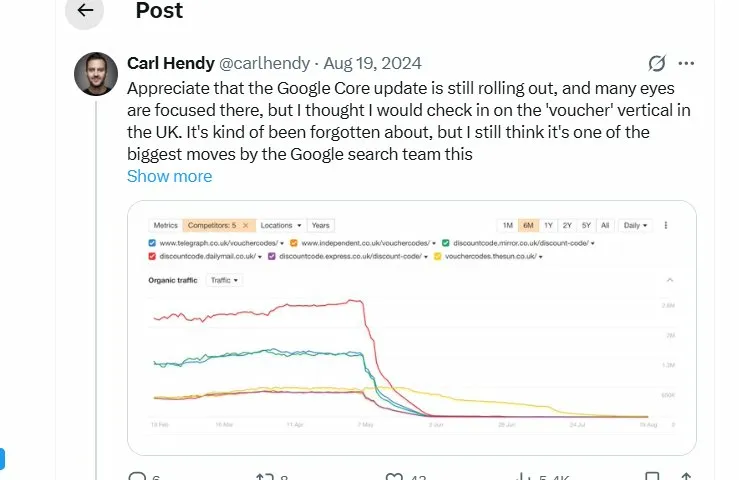
This traffic graph shows what happened to major coupon and voucher code sites in the UK during Google’s June 2024 algorithm update. Sites like Telegraph vouchers, Independent discount codes, and Express voucher codes saw 70-90% traffic drops virtually overnight.
What many people don’t remember is that before this crackdown, some major publishers were running selective noindex strategies. Reuters, LA Times, and other news organizations operated coupon sections that used <meta name="googlebot" content="noindex"> to hide from Google while ranking freely in Bing.
The logic was simple: Google was penalizing affiliate coupon content, but Bing wasn’t. So these sites blocked Google specifically while capturing Bing traffic. It worked for a while—until Google caught on and started penalizing sites that employed these tactics.
Most of those coupon sections were eventually deleted entirely rather than risk contaminating the main site’s rankings.
Example of selective blocking:
html
<!-- Block Google, allow others -->
<meta name="googlebot" content="noindex, nofollow">
<meta name="bingbot" content="index, follow">
<meta name="yandex" content="noindex">
This level of control can be useful for legitimate reasons—like blocking low-quality translated content from certain search engines while allowing it in others—but it should be used carefully. Search engines don’t look kindly on manipulation tactics.
When Noindex Works Best
Noindex is ideal when:
- You control the website
- The content is outdated, low-value, or should be private
- You want the page accessible to users but not searchable
- You’re cleaning up duplicate content issues
- You need reliable de-indexing that search engines must honor
Common use cases include old press releases, internal tools, staging environments, thin content pages, or anything that shouldn’t rank but needs to remain publicly accessible.
Noindex Limitations
Noindex doesn’t work if:
- You don’t control the site
- The page is blocked by robots.txt (search engines can’t see the tag)
- The page returns a 404 or 410 error (it’s already gone)
- You need instant removal (noindex requires re-crawling)
Processing time varies. High-authority pages on frequently crawled sites may be de-indexed within 3-7 days. Lower-priority pages on smaller sites can take 2-4 weeks or longer.
The 403 Forbidden Nuclear Option
When noindex and robots.txt aren’t strong enough, server-level blocking provides absolute control. A 403 Forbidden response tells browsers and bots that access is permanently denied.
This is different from a 404 (Not Found) or 410 (Gone). Those codes say “this content doesn’t exist.” A 403 says “this content exists, but you’re not allowed to see it.”
Apache .htaccess example:
apache
<FilesMatch "private-content.html">
    Order Allow,Deny
    Deny from all
</FilesMatch>
Nginx configuration:
nginx
location /private-section/ {
    return 403;
}
Block specific user agents at server level:
apache
RewriteEngine On
RewriteCond %{HTTP_USER_AGENT} (GPTBot|CCBot|PerplexityBot) [NC]
RewriteRule .* - [F,L]
403 responses are useful when:
- Content contains sensitive information
- You want absolute blocking regardless of who’s crawling
- Noindex tags might be removed accidentally
- You’re dealing with aggressive scrapers
The downside? 403 blocks everyone, including legitimate users. If the content needs to be accessible to some people (like logged-in users), you’ll need conditional logic rather than a blanket 403.
AI Bots Ignore Most Traditional Blocking Methods
This is where things get messy in 2026. Traditional search engines like Google and Bing generally respect robots.txt and always honor noindex. AI crawlers? Not so much.
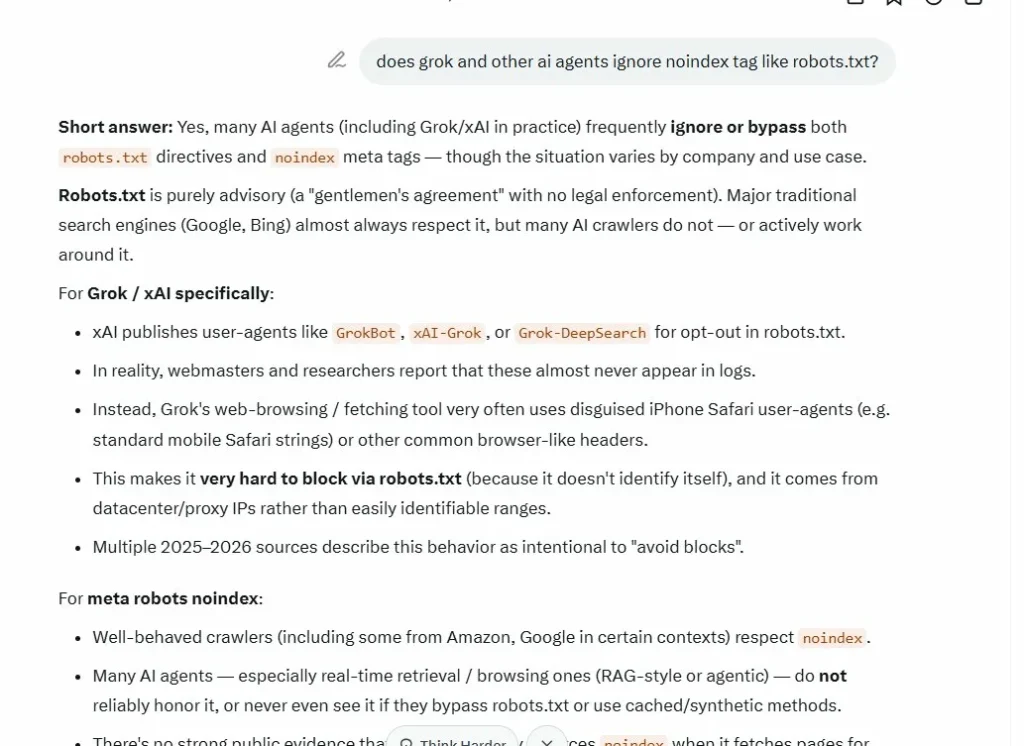
Grok (xAI’s bot), confirming itself in my chat, ignoring robots.txt in practice, even though their official documentation claims they respect it.
Nick Kapur tweet from November 15, 2025:
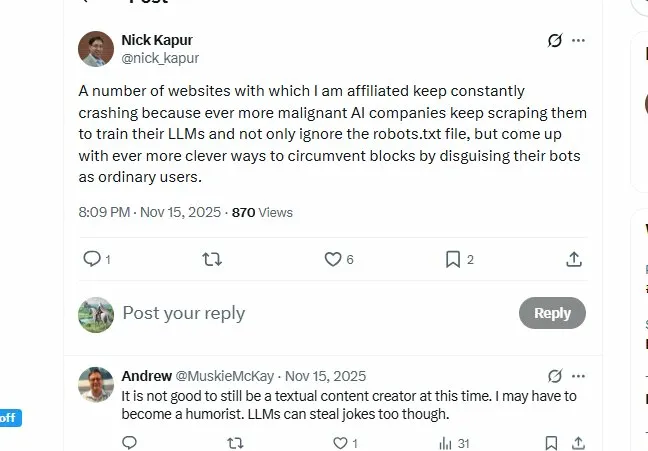
“A number of websites with which I am affiliated keep constantly crashing because ever more malignant AI companies keep scraping them to train their LLMs and not only ignore the robots.txt file, but come up with ever more clever ways to circumvent blocks by disguising their bots as ordinary users.”
This is the reality content creators face. AI companies are in an arms race to gather training data, and many have decided that polite crawling rules don’t apply to them.
Common AI Bots and Their Behavior
GPTBot (OpenAI):
- Official user agent: GPTBot
- Claimed behavior: Respects robots.txt
- Reality: Generally compliant when identified, but reports of undeclared crawlers
CCBot (Common Crawl – used by many AI companies):
- Official user agent: CCBot
- Claimed behavior: Respects robots.txt
- Reality: Inconsistent; some reports of ignoring blocks
anthropic-ai / ClaudeBot (Anthropic):
- Official user agents: anthropic-ai, Claude-Web
- Claimed behavior: Respects robots.txt and crawl-delay
- Reality: Better compliance than most, but heavy traffic volume
PerplexityBot:
- Official user agent: PerplexityBot
- Claimed behavior: Respects robots.txt
- Reality: Cloudflare exposed them using stealth, undeclared crawlers to evade blocks
Google-Extended:
- Official user agent: Google-Extended
- Purpose: AI training (separate from regular Googlebot)
- Behavior: Respects robots.txt blocks specific to Google-Extended
Other aggressive crawlers to watch:
- Bytespider (ByteDance/TikTok) – Heavy crawler, often ignores crawl-delay
- Amazonbot – Amazon’s crawler, can be aggressive
- Meta-ExternalAgent – Facebook’s scraper
- Applebot-Extended – Apple Intelligence training
- Diffbot – Commercial web data extraction
- SemrushBot – SEO tool, can generate heavy load
- Others: Applebot, MJ12bot, Meta-webindexer
The common pattern? Official bots with declared user agents mostly respect robots.txt. But many AI companies run undeclared scrapers using generic browser user agents to avoid detection.
Why AI Bots Bypass Traditional Controls
Robots.txt is easy to ignore. There’s no enforcement mechanism. It’s a text file making polite requests. AI companies training models on billions of web pages have decided the competitive advantage of more data outweighs the social contract.
Noindex tags don’t apply to AI training. A noindex tag tells search engines “don’t show this in search results.” It says nothing about using the content for training language models. Many AI companies argue that training isn’t indexing, so noindex doesn’t apply.
Crawl-delay is widely ignored. The Crawl-delay directive in robots.txt asks bots to wait between requests. Most AI crawlers ignore this completely, leading to sites being hammered with requests that can cause slowdowns or crashes.
What Actually Works Against AI Crawlers
1. Rate limiting at the server level (Cloudflare or other CDN)
2. 403 Forbidden responses for known bot user agents
3. JavaScript challenges that bots can’t complete
4. Behavioral analysis that identifies and blocks scraping patterns
5. Legal action (some companies have sued AI crawlers successfully)
But realistically, there’s no perfect solution yet. The best defense is layered protection that makes scraping expensive and difficult.
Cloudflare Bot Protection: The Most Effective Defense
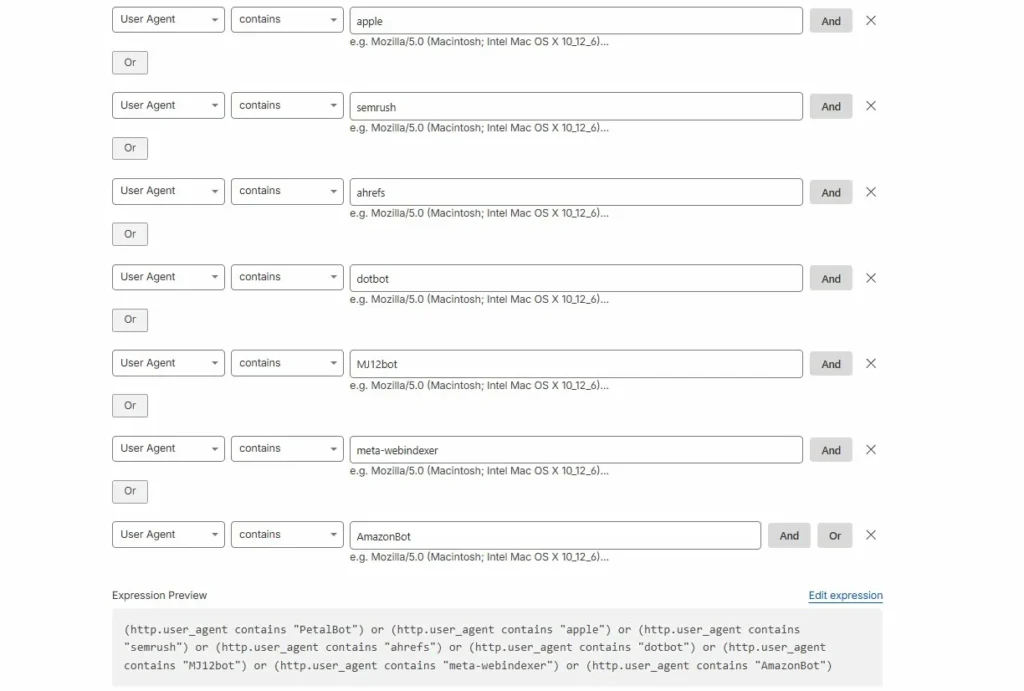
Unlike robots.txt, which politely asks bots to behave, Cloudflare enforces blocking at the infrastructure level. This is the single most effective tool against aggressive AI crawlers in 2026.
Why Cloudflare Works Where Robots.txt Fails
Cloudflare sits between your server and incoming traffic. Requests never reach your server until Cloudflare decides they’re legitimate. This means:
- Blocking happens before your server gets hit (no performance impact)
- You can’t be overwhelmed with scraping requests that crash your site
- Bots can’t easily bypass by changing user agents
- JavaScript challenges verify visitors are actually using browsers
Cloudflare Bot Protection Features
Bot Fight Mode (Free Plan):
- Blocks known bad bots automatically
- Simple toggle, no configuration needed
- Good for basic protection
Super Bot Fight Mode (Pro/Business Plans):
- Definitely automated traffic: Block or challenge
- Likely automated traffic: Choose how to handle
- Verified bots: Allow good bots (Googlebot, etc.)
- JavaScript detection: Challenge suspicious traffic
Custom Rules (All Plans):
(http.user_agent contains "GPTBot") or
(http.user_agent contains "CCBot") or
(http.user_agent contains "PerplexityBot")
Action: Block
Rate Limiting (Pro+ Plans):
- Limit requests per IP address
- Block IPs exceeding thresholds
- Protect specific endpoints
Challenge Pages:
- JavaScript challenges (most effective)
- CAPTCHA challenges (backup option)
- Managed challenges (automatic decision)
Setting Up Basic Bot Blocking in Cloudflare
- Enable Bot Fight Mode (Security > Bots)
- Create a custom firewall rule for known AI bots:
- Security > WAF > Custom rules
- Rule:
(http.user_agent contains "GPTBot") - Action: Block
- Set up rate limiting for suspicious patterns:
- Security > WAF > Rate limiting rules
- When: Requests exceed threshold
- Action: Block for 1 hour
- Monitor the Firewall Events log to see what’s being blocked
This layered approach stops most aggressive AI crawlers while allowing legitimate traffic through. It’s not perfect—bots using residential proxies and real browser user agents can still get through—but it dramatically reduces the problem.
Why This Matters More Than Ever
Nick Kapur’s tweet highlighted a real problem: AI companies crashing affiliate sites by scraping them so aggressively that servers can’t handle the load. This isn’t theoretical. Sites go down, lose revenue, and face increased hosting costs because bots ignore crawl-delay and hammer servers.
Cloudflare fixes this. Even if bots ignore your robots.txt, Cloudflare enforces limits that keep your site running. That’s why it’s become essential infrastructure rather than optional protection.
Google’s Removal Tool and What It Can’t Do
For content you control, Google Search Console offers removal tools that work faster than waiting for noindex to be processed.
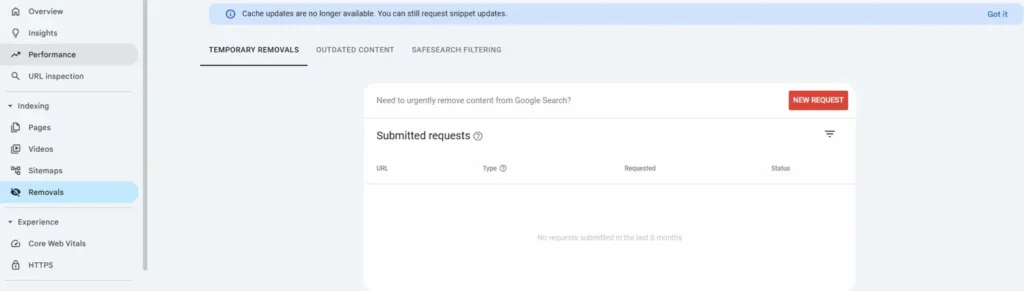
The Removals tool in Search Console allows you to request urgent removal of content from Google Search. This is different from noindex—it’s a direct request to Google to hide specific URLs.
Types of Removal Requests
Temporary Removals:
- Removes URLs from search for ~6 months
- Use when you need immediate delisting while implementing permanent fixes
- No impact on site’s overall standing
- Requires site verification in Search Console
Outdated Content:
- For pages that no longer exist or have changed significantly
- Users can submit without owning the site
- Takes 24-48 hours typically
SafeSearch Filtering:
- Removes adult content from SafeSearch results
- Useful for reputation cleanup involving inappropriate images
The Process
- Go to Search Console > Indexing > Removals
- Click “New Request”
- Enter the URL you want removed
- Select removal type (temporary removal, clear cached URL, etc.)
- Submit and wait for processing (usually 24-48 hours)
Google evaluates the request and either approves or denies it. If approved, the URL disappears from search results almost immediately.
What Removal Requests Can and Cannot Do
Removals can:
- Remove specific URLs from Google Search
- Hide pages quickly while you implement permanent solutions
- Limit exposure during reputation crises
- Work faster than waiting for crawl cycles
Removals cannot:
- Delete content from the website itself
- Remove content from other search engines (Bing, DuckDuckGo, etc.)
- Guarantee permanent removal if policies change
- Override legitimate news or public interest content
- Remove content from AI training data or chatbot citations
The AI Citation Problem
This is the gap that exists in 2026: There’s no removal option for AI citations. You can remove a page from Google Search, but you can’t remove it from:
- ChatGPT’s training data
- Claude’s knowledge base
- Perplexity’s answer citations
- Google’s AI Overview answers (immediately)
Once AI models are trained on content, that information persists in the model. Even if the source page is deleted, de-indexed, and removed from search, AI chatbots may still reference information from it.
The only real solution is preventing AI crawlers from accessing content in the first place—which brings us back to Cloudflare-level blocking rather than noindex tags.
For anyone dealing with negative content, this creates a new challenge. Original de-indexation and removal basics still apply for search engines, but AI citations require different strategies.
What Actually Works: A Layered Approach for 2026
No single method solves every de-indexing problem. Effective cleanup uses multiple tools strategically based on what you control and what you’re trying to accomplish.
Step-by-Step Strategy
1. Audit what’s ranking
- Identify pages you own vs third-party content
- Check which are indexed in Google (use
site:yourdomain.comsearch) - Determine if content is news, expired, or low-quality
2. Fix owned content first
- Add noindex to pages you want de-indexed
- Remove robots.txt blocks that prevent crawling
- Ensure important pages aren’t accidentally blocked
3. Use removal tools for urgent situations
- Submit temporary removal requests in Search Console
- This gives immediate delisting while permanent changes take effect
- Monitor status and resubmit if needed
4. Block AI crawlers at infrastructure level
- Enable Cloudflare Bot Fight Mode or equivalent
- Create custom rules for known AI bots
- Set up rate limiting to prevent overload
5. Request removals for third-party content
- Use Google’s “Remove outdated content” tool
- File personal information removal requests if applicable
- Contact site owners directly for takedowns when appropriate
6. Suppress what can’t be removed
- Create positive content that ranks above negative results
- Build authority pages that push unwanted results down
- Consistent publishing over time beats trying to remove everything
Realistic Timelines
Noindex processing: 3-14 days depending on crawl frequency and site authority
Robots.txt changes: Effective immediately for new crawls, but doesn’t remove existing indexes
Google removal requests: 24-48 hours for temporary removals; varies for permanent
AI crawler blocking via Cloudflare: Immediate effect once rules are active
AI training data removal: Effectively impossible once models are trained
Content suppression: 3-6 months to see significant ranking changes
The fastest results come from Google’s removal tool combined with noindex. But for long-term cleanup, building positive content that outranks negative results is often more effective than trying to remove everything.
Common Mistakes That Waste Time
- Blocking pages with robots.txt when you want them removed from search. This prevents search engines from seeing noindex tags and can actually delay removal.
- Adding noindex to pages already blocked by robots.txt. The noindex tag can’t be read if crawlers can’t access the page.
- Filing removal requests without checking eligibility. Google rejects requests that don’t meet policy requirements. Read the guidelines first.
- Expecting instant results without follow-up. Noindex requires re-crawling. If your page isn’t crawled frequently, it takes longer.
- Ignoring AI crawlers. In 2026, de-indexing from Google Search isn’t enough. AI bots need separate handling.
Small technical mistakes like these can add weeks to cleanup timelines. Getting the sequence right—remove robots.txt blocks, add noindex, submit removal request, implement Cloudflare blocking—ensures each step works properly.
FAQ: Common De-Indexing Questions
Not always. A page can be re-indexed if the noindex tag is removed, the page changes significantly, or Google’s policies change. Monitoring is essential to catch re-indexing early.
Not directly. For third-party content, you must rely on Google’s removal request tools (outdated content, personal information removal) or contact the site owner for takedowns. In some cases, legal action may be necessary.
Usually 3-14 days, depending on how often Google crawls the page. High-authority sites with frequent crawling see faster results. Lower-priority pages may take a month or more.
Because robots.txt controls crawling, not indexing. If Google finds links to your blocked URLs from other sites, it may index them without crawling the content. Use noindex instead.
Not for training purposes. Noindex tells search engines not to show pages in search results. AI companies argue training models isn’t “indexing,” so noindex doesn’t apply. Most AI crawlers only respect server-level blocking (403 Forbidden) or infrastructure-level filtering (Cloudflare).
If the content involves legal risk, active news coverage, or appears across multiple platforms, professional guidance helps avoid mistakes and wasted effort. SEO consultants or reputation management firms can handle complex cases more efficiently.
Yes, using targeted meta tags like <meta name="googlebot" content="noindex"> while leaving Bing unrestricted. But be cautious—search engines penalize manipulation tactics. This should only be used for legitimate reasons, not to game different search engines.
Final Thoughts
De-indexing in 2026 requires understanding multiple systems that don’t always cooperate. Robots.txt and noindex still work for traditional search engines. AI crawlers need different approaches. Urgent situations call for removal requests. High-traffic sites benefit from Cloudflare’s infrastructure-level blocking.
The key is knowing which tool solves which problem. If you control the site and want reliable de-indexing, use noindex. If you’re dealing with aggressive AI scrapers, implement Cloudflare bot protection. If you need immediate removal from Google, use Search Console’s removal tool.
For comprehensive de-indexation and removal basics, combining these methods strategically produces better results than relying on any single approach. Focus on control first (what you can change directly), policy second (removal requests for third-party content), and suppression last (building positive content when removal isn’t possible).
That clarity turns a frustrating problem into a manageable plan.