Reaching out to new prospects through cold emails can be a game-changer— if you’re using the right software. The truth is, not all tools are built the same. Some just send emails, while others give you the edge to stand out, get noticed, and spark real conversations.
- Essential Features Every Cold Email Marketing Software Must Have
- Domain Warm-up: The Make-or-Break Feature Most People Ignore
- Automation Logic: When Simple Sequences Aren’t Enough
- Personalization That Actually Works (Not Just “Hi {FirstName}”)
- Compliance: The Boring Stuff That Keeps You Out of Legal Trouble
- CRM Integration: Where Most Tools Completely Fall Apart
- Deliverability and Reputation Management
- Analytics and Performance Intelligence
- Your Questions Answered About Cold Email Marketing Software
- Making Your Final Decision
Choosing the best cold email marketing software isn’t just about fancy dashboards or big promises. It’s about finding a tool that helps you connect better, track smarter, and grow faster. If you’ve ever felt stuck wondering which platform is worth your time, you’re not alone.
This guide will help you cut through the noise and focus on what truly matters when picking a tool that works hard for your outreach goals.
Essential Features Every Cold Email Marketing Software Must Have
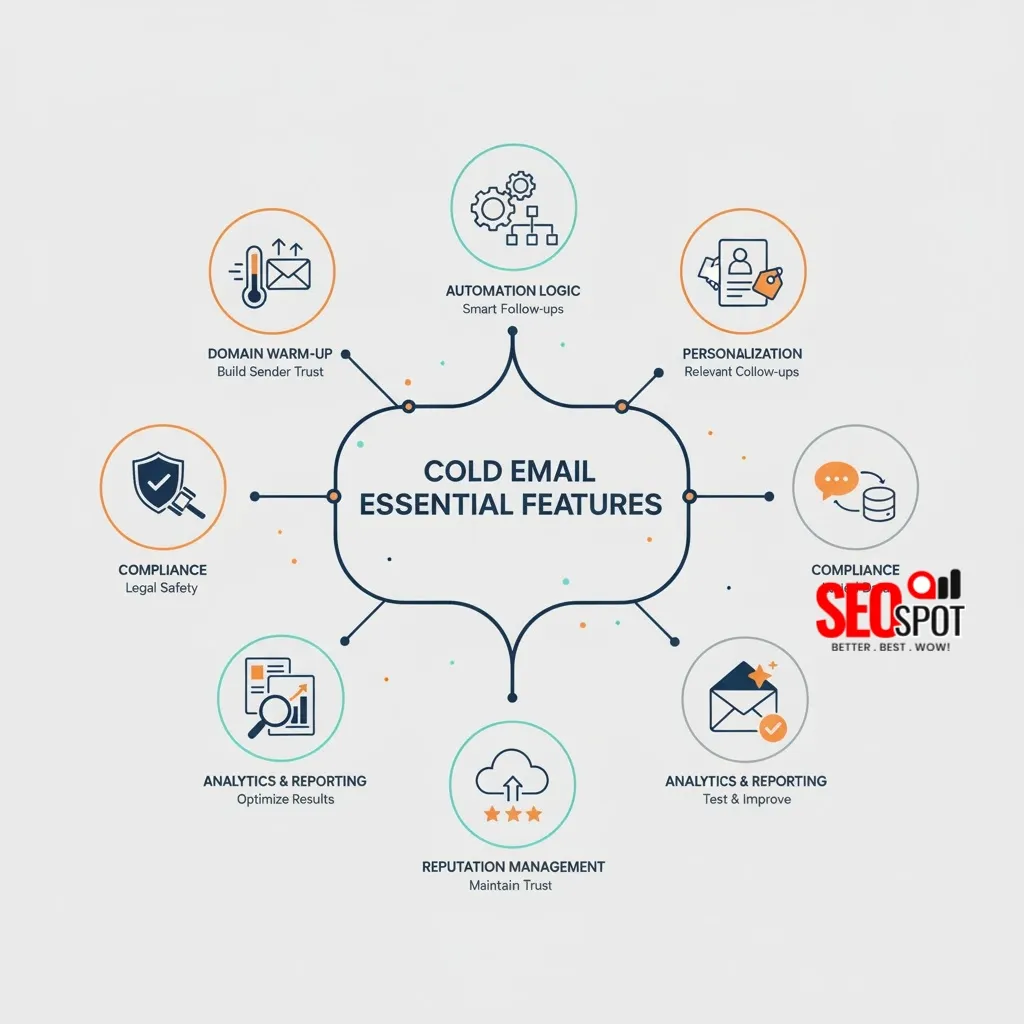
Before diving into specific platforms, it’s essential to understand the core capabilities that will drive your outreach success. The best cold email marketing software should offer robust functionality that balances ease of use with powerful features. Your choice will significantly impact deliverability, efficiency, and ultimately your return on investment.
Domain Warm-up: The Make-or-Break Feature Most People Ignore
You buy cold email software, load up your shiny new domain, and fire off your first campaign to 500 prospects. Within 48 hours, your emails are landing straight in spam folders, and within a week, your domain reputation is toast. Sound familiar?
This happens because most people treat cold email like a fire hose – they think more volume equals more results. But email providers like Gmail and Outlook are watching. They see a brand new domain suddenly blasting out hundreds of emails and immediately flag it as suspicious. Your sender reputation tanks before you even get started.
The best cold email tools solve this with gradual domain warm-up. They start by sending just a few emails per day from your new domain, then slowly ramp up the volume over weeks. Some even create fake conversations between your domain and their network of aged domains to build sending history. It’s like breaking in a new pair of shoes instead of running a marathon on day one.
Companies that skip this step usually realize their mistake when their open rates hover around 2% instead of the 20-30% they were expecting. By then, it’s too late – they need a new domain and have to start over.
Automation Logic: When Simple Sequences Aren’t Enough
Let’s say you’re Sarah, running lead generation for a B2B software company. You’ve got a list of 1,000 marketing directors, and you want to send them a 5-email sequence over two weeks. Sounds straightforward, right?
Here’s what actually happens: On day 3, David from TechCorp replies asking for more information. Your automation keeps sending him emails 4 and 5 anyway, because your software doesn’t know he already engaged. He gets annoyed and marks you as spam.
Meanwhile, Jennifer from StartupXYZ opens your first email but never responds. After your sequence ends, she sits in your CRM forever while you manually wonder if you should follow up or move on.
Good automation logic prevents both disasters. When David replies, the software automatically stops his sequence and can trigger a different workflow – maybe it adds him to a “hot prospects” list or alerts your sales team. For Jennifer, the software might wait 30 days after the sequence ends, then automatically start a different campaign designed for warm leads who didn’t convert.
The best tools let you build complex “if this, then that” logic without needing a computer science degree. Sarah can set up rules like “if someone clicks the pricing link but doesn’t reply, wait one week then send the case study email” or “if someone’s out-of-office auto-reply mentions they’re back next month, pause their sequence until then.”
Companies using basic automation typically see 15-20% of their engaged prospects fall through the cracks because there’s no system to handle different response scenarios. The sophisticated stuff might seem overkill until you realize each lost lead could be worth thousands in revenue.
Personalization That Actually Works (Not Just “Hi {FirstName}”)
Personalization goes far beyond simply inserting a recipient’s name. Modern cold email platforms should offer dynamic customization options that make each message feel individually crafted. Look for software that allows you to personalize based on recipient behavior, demographics, and engagement history.
Most cold email tools act like slapping someone’s first name in the subject line counts as personalization. It doesn’t. Your prospects get dozens of emails that start with “Hi Sarah” every day, and they can smell the template from a mile away.
Real personalization means your software can pull in details about the prospect’s company, their recent LinkedIn activity, or even reference their latest blog post. Say you’re reaching out to marketing managers at SaaS companies. Instead of “Hi Sarah, I help marketing teams grow faster,” you’d send “Hi Sarah, saw TechCorp just launched that new integration feature – bet your team’s swamped with launch campaigns right now.”
The difference is night and day. Generic emails get 1-3% reply rates. Properly personalized ones can hit 15-20%. But here’s the catch – most people buy software that promises “advanced personalization” only to discover it can barely handle more than basic merge tags. They end up spending hours manually customizing emails, which defeats the whole point of automation.
The tools worth buying let you create dynamic content blocks that change based on the prospect’s industry, company size, or recent activity. Some even generate personalized images automatically – like charts showing the prospect’s company growth or screenshots of their website with annotations.
Compliance: The Boring Stuff That Keeps You Out of Legal Trouble
Every legitimate cold email needs an unsubscribe link. Sounds simple enough, but you’d be amazed how many people mess this up and end up with angry prospects or worse – legal problems.
Your software should automatically add compliant unsubscribe language to every email and handle opt-outs instantly. When someone clicks unsubscribe, they should be removed from all your campaigns immediately, not just the current sequence. Some companies learn this the hard way when a prospect unsubscribes but keeps getting emails from different campaigns, then files a complaint.
Good compliance features also track bounced emails and automatically clean your lists. This protects your sender reputation and keeps you on the right side of anti-spam laws.
CRM Integration: Where Most Tools Completely Fall Apart
Picture this: You’re using HubSpot to track your deals, Calendly for booking meetings, and some shiny new cold email tool for outreach. A prospect replies to your email showing interest. Now what?
With bad integration, you’re manually copying email replies into HubSpot, trying to remember which prospects came from which campaigns, and losing track of who’s actually moving through your sales process. It’s a nightmare that wastes hours every week.
Take Mike, who runs sales for a consulting firm. He spent two months using a cold email tool that promised “seamless CRM integration.” Turns out their idea of integration was a basic Zapier connection that only synced contact names. When prospects replied or clicked links, nothing updated in his CRM. He was essentially running two separate systems and manually connecting the dots.
Mike switched to a tool with proper two-way sync. Now when someone replies to a cold email, it automatically creates a deal in HubSpot, tags the contact as “engaged,” and can even book a meeting directly through Calendly. The prospect’s entire email history shows up in the CRM deal record.
The frustration hits worst when you’re trying to report on ROI. Without proper integration, you can’t tell which cold email campaigns actually generated revenue. You’re flying blind on what’s working and what’s not, making it impossible to optimize your outreach.
Deliverability and Reputation Management
Even the most perfectly crafted email is worthless if it never reaches the inbox. Strong deliverability features are non-negotiable when evaluating cold email software reviews. The platform should include built-in email warm-up capabilities to gradually build sender reputation.
Look for tools that support proper authentication protocols like SPF, DKIM, and DMARC. These technical standards help receiving servers verify that your emails aren’t spoofed or fraudulent. Blacklist monitoring alerts you to potential deliverability issues before they severely impact your campaigns.
Analytics and Performance Intelligence
Data-driven optimization is essential for maximizing campaign effectiveness. Comprehensive analytics help you understand which features of cold email software drive results. Look for tools offering advanced attribution modeling that tracks conversions across the entire sales funnel.
A/B testing capabilities with statistical significance reporting identify truly effective messaging approaches. Predictive analytics and lead scoring help you prioritize follow-up efforts with the most promising prospects. Visual reporting dashboards make these insights accessible without requiring data science expertise.
Your Questions Answered About Cold Email Marketing Software
Look for personalization capabilities, automation sequences, deliverability tools like email warm-up and authentication, analytics for tracking performance, and compliance features for legal requirements. Integration capabilities with your existing tech stack and scalability for future growth are also crucial considerations.
The 30/30/50 rule for cold emails suggests spending 30% of your effort on crafting personalized subject lines, 30% on optimizing email deliverability, and 50% on follow-ups to enhance cold email response rates.
Woodpecker and Emailchaser are good for sending cold emails if you want something simple.
Making Your Final Decision
Selecting the right cold email platform requires understanding both your current needs and future growth plans. Consider starting with a free trial of your top contenders to evaluate usability and compatibility with your workflows. Pay close attention to deliverability results and support responsiveness during this testing phase. The right software will combine powerful features with intuitive operation, allowing you to focus on crafting compelling messages rather than wrestling with technical complexities.



![SOLVED [PII_EMAIL_A82092CD8885C9372C33] ERROR](https://theseospot.com/blog/wp-content/uploads/2021/11/SOLVED-PII_EMAIL_A82092CD8885C9372C33-ERROR.jpg)