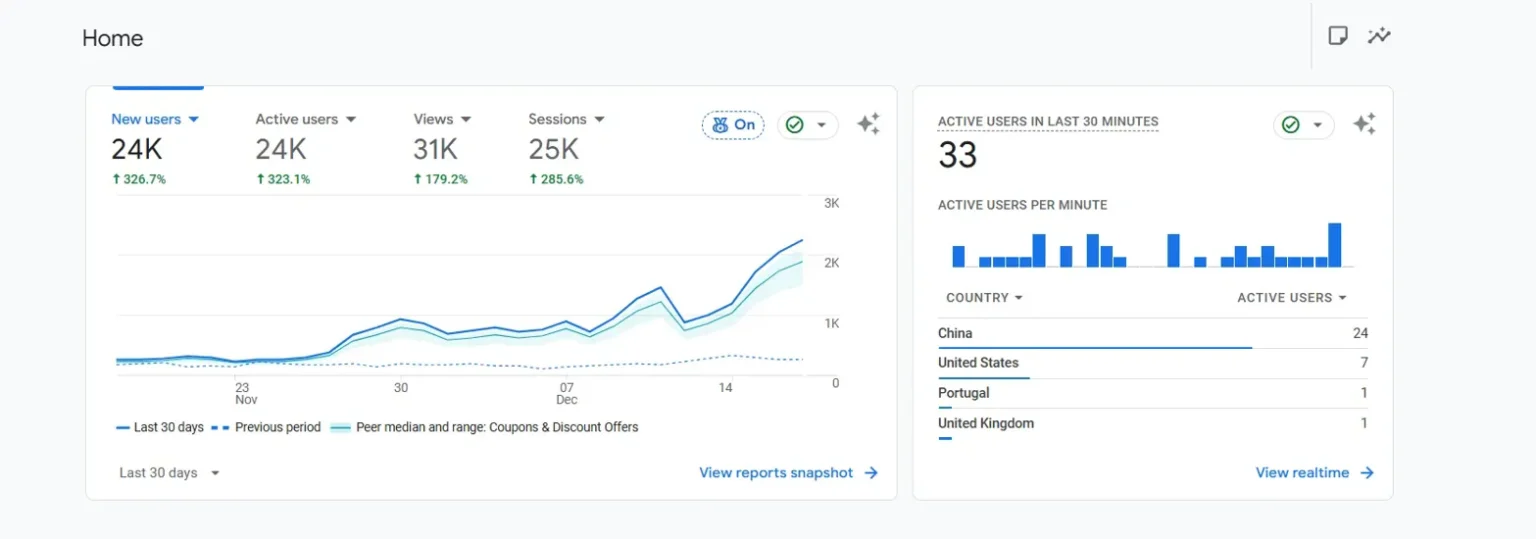
If you’ve been watching Google Analytics 4 since mid-September and seen your traffic metrics suddenly explode from China and Singapore, you’re not alone. Hundreds of site owners are reporting the same issue on Google Search Central forums, Reddit, and analytics communities — massive traffic spikes, Direct traffic attribution, engagement rates tanking, and bounce rates shooting through the roof.
- The Pattern Everyone’s Seeing (And Why Blocking China Doesn’t Work)
- What This Actually Is (Confirmed Through Testing)
- Why Your Bounce Rate Isn’t Your Fault
- Why This Matters (And Why Robots.txt Doesn’t Stop Them)
- The Nuclear Option: Blocking Entire Countries
- Solution If Not Blocking China: BlockSpecific ASNs
- Step-by-Step: Creating the Cloudflare WAF Rule
- Other ways If you are not using Cloudflare
- It will Continue (But At Least We have a Solution)
The frustrating part is everyone’s first instinct is to panic about their site quality. “Why is my bounce rate suddenly 80%?” “Did I break something with the last update?” “Is my content suddenly terrible?” No. Your site is fine. This is bot traffic, and it’s hitting WordPress sites, Shopify stores, custom builds — basically everything with a public URL.
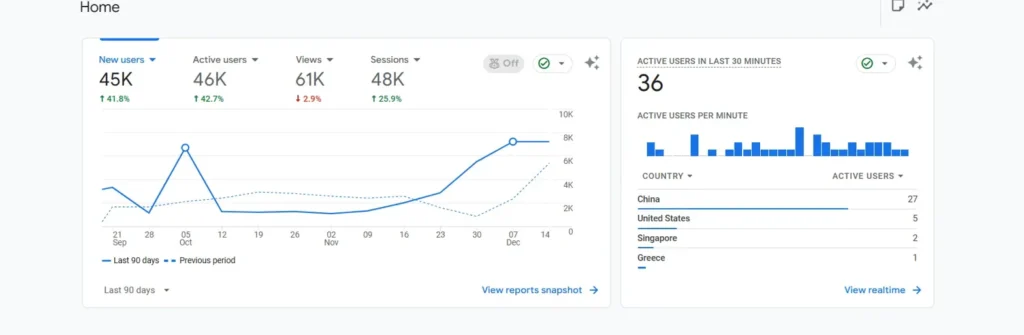
Ok, so if you see this image it is from one of my websites where I saw china hitting our site again n again. So after first spike I blocked china at first and got it solved. But when I started noticing this same pattern on our other websites as well, I really needed to find this what is going here.
Well.
One of my websites was showing:
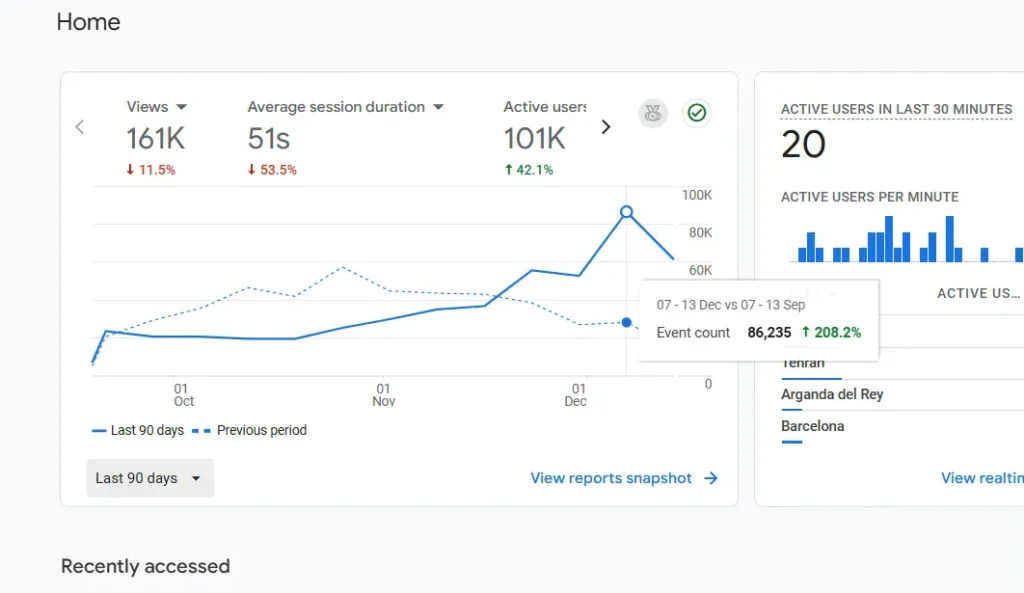
New users up 208% event count increase. Those numbers look amazing until you realize none of it’s converting. Session durations under 10 seconds, zero interaction with actual content, engagement rates near zero. Everything shows as Direct traffic from China and Singapore with no referral source or campaign data.
The Reddit and Google Support Commumity thread has over 300 people reporting identical patterns. Google’s official response? “Create segments in Explore reports to filter it out.” That’s not a solution, that’s hiding the problem. Your data is still polluted, your bounce rates are still artificially inflated, and if you’re on GA360, you’re paying for bot traffic.
The Pattern Everyone’s Seeing (And Why Blocking China Doesn’t Work)
The traffic fingerprint is consistent across every site I’ve checked. China becomes your top traffic source overnight, sometimes accounting for more active users than your actual target market. Singapore follows close behind. Both countries show massive spikes in Direct traffic with engagement metrics that make no sense.
Here’s where it gets tricky — blocking China alone doesn’t solve it. I tested this first because it seemed like the obvious fix. Created a Cloudflare WAF rule to block all Chinese IPs, checked GA4 the next day, and China traffic was gone. Great, problem solved, right?
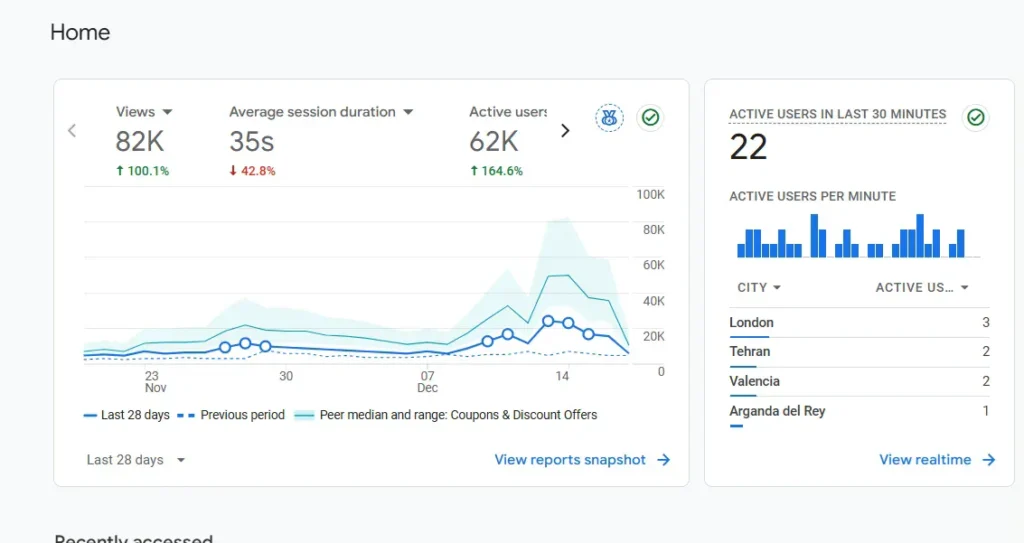
Spam visits got cooldown but but: Singapore traffic doubled
The bots just rerouted through Singapore infrastructure instead. That’s when I realized these aren’t random bots from various sources — this is coordinated scraping using distributed infrastructure across multiple countries. Blocking by geography is playing whack-a-mole.
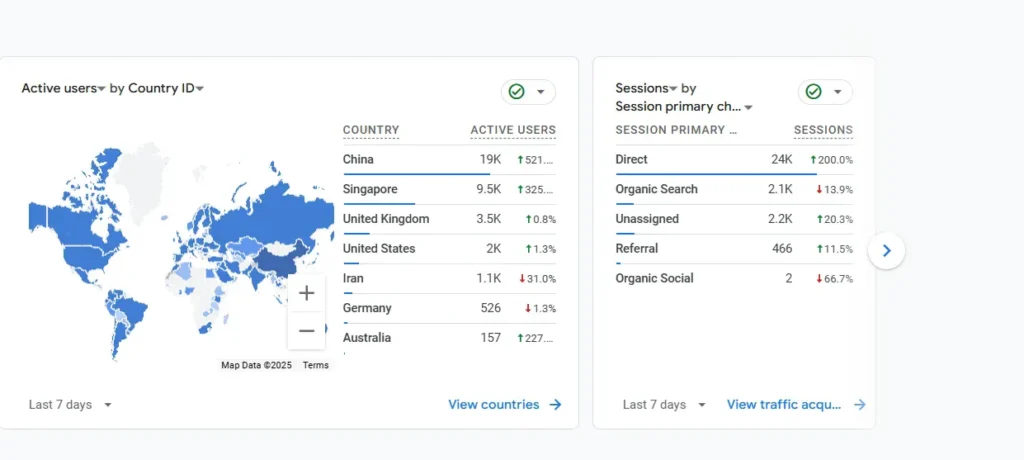
Do you see this 24k direct hits?
Your bounce rate isn’t spiking because your content suddenly got worse or your site is broken. It’s spiking because thousands of bot sessions with zero engagement are being averaged into your metrics. When GA4 calculates your overall bounce rate, it’s including sessions that hit one page, stay for 3 seconds, and disappear. That drags down every other metric too.
What This Actually Is (Confirmed Through Testing)
People in the Search Central forum kept speculating — is it Google’s crawler misbehaving? Is it a DDoS attack? Is it competitors scraping content? I wanted actual evidence, so I set up logging through Cloudflare to capture details on these requests instead of just seeing them aggregated in GA4.
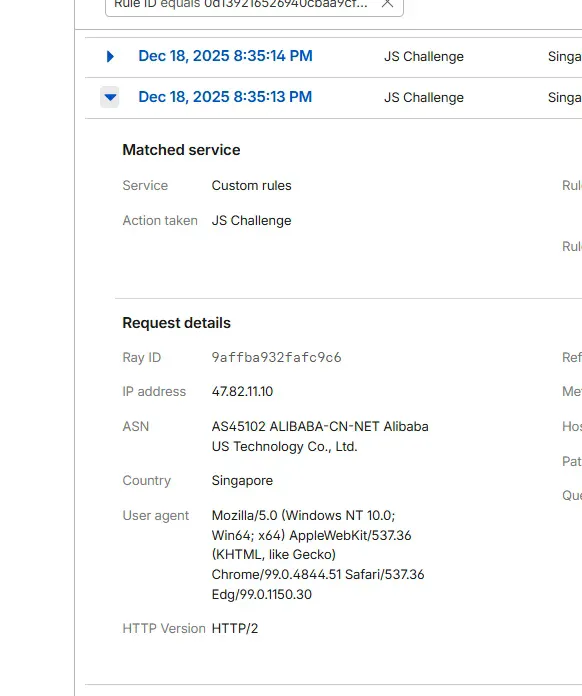
When I filtered Cloudflare’s Security Events for the blocked traffic from these regions, the ASN (Autonomous System Number) showed up in the request details: AS45102, owned by Alibaba Technology Co., Ltd.
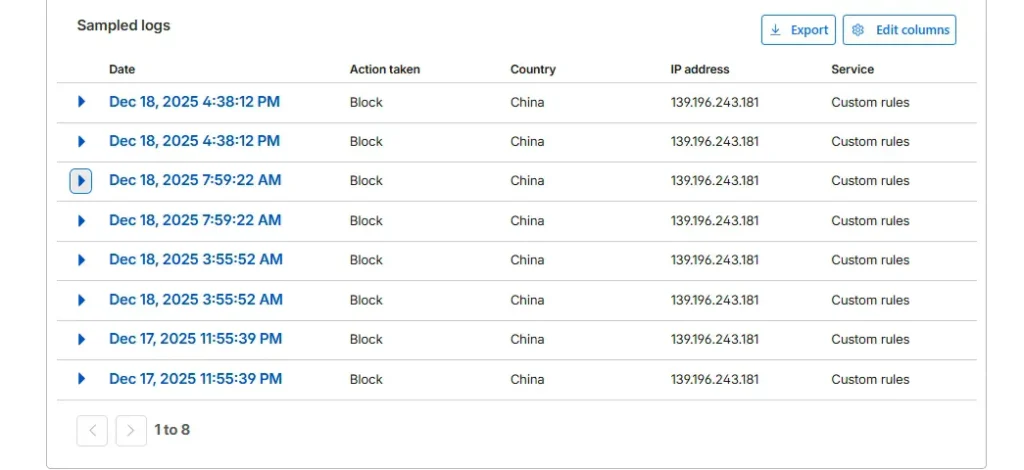
This isn’t random bot traffic. Alibaba is actively scraping websites at scale, and based on the timing and volume, they’re likely feeding content into AI training pipelines. The Singapore routing makes sense now — Alibaba has major infrastructure there, and routing through Singapore gives them geographic distribution while accessing content from multiple regions.
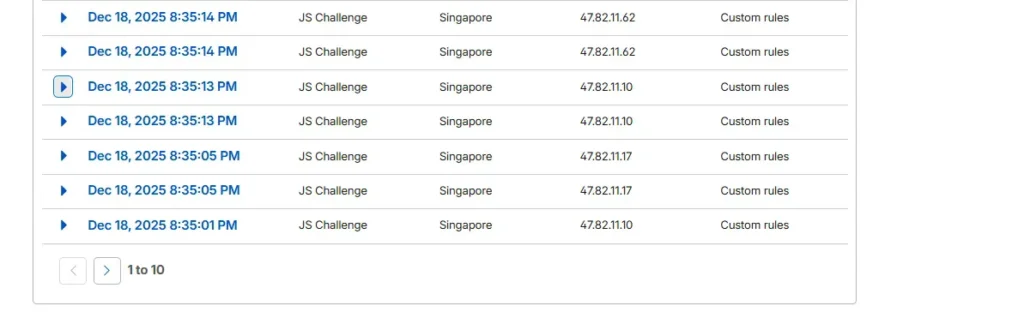
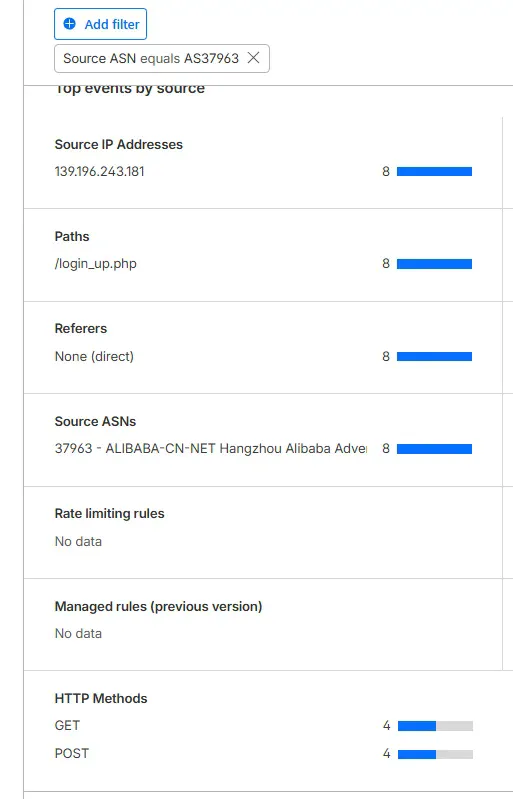
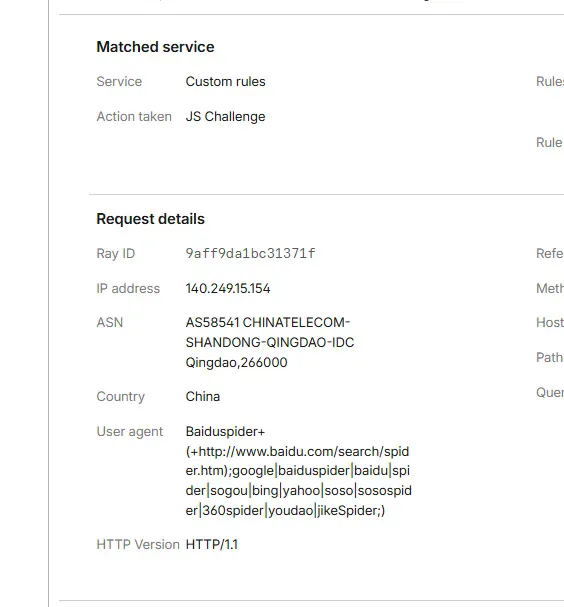
I also found AS55967 showing up, which belongs to Baidu. Same pattern, same behavior. Both companies are scraping aggressively, both are ignoring robots.txt directives, and neither is identifying their bots properly in user agent strings. They’re designed to look like regular browser traffic, which is why GA4’s bot filtering doesn’t catch them.
Why Your Bounce Rate Isn’t Your Fault
When a legitimate user visits your site and leaves after viewing one page, that’s a bounce. When an Alibaba scraper hits your homepage, records the HTML, and disconnects after 3 seconds with zero interaction, GA4 also counts that as a bounce. Your overall bounce rate is the average of both.
If you’re suddenly seeing 75-80% bounce rates when you historically had 40-50%, and the spike coincides with the China/Singapore traffic increase, the bots are the cause. Your content hasn’t changed, your UX hasn’t degraded, your site speed hasn’t tanked — your analytics are just polluted with thousands of non-human sessions.
This also explains why engagement rate dropped. GA4’s engagement rate measures sessions with meaningful interaction — more than 10 seconds duration, multiple pageviews, or conversion events. Bot sessions trigger session_start and page_view events, then nothing else. Zero engagement. When those sessions make up 30-40% of your total traffic, your overall engagement rate collapses.
The frustration in the Search Central forum is real because site owners are making business decisions based on corrupted data. They’re changing strategies, adjusting budgets, and questioning what’s working based on metrics that include thousands of bot sessions. Once you filter out this traffic, your actual performance metrics return to normal.
Why This Matters (And Why Robots.txt Doesn’t Stop Them)
In race of scraping as much web contents as possible to train AI models, tech companies are in a race. OpenAI does it. Google does it. Anthropic does it. And the same thing is being done by Alibaba and Baidu, only they are not playing by the set rules.
The conventional web crawlers recognize themselves through their user agent strings. GoogleBot identifies itself conspicuously. Valid crawlers obey robots.txt files which instruct them not to visit particular pages. You can instruct GoogleBot not to crawl my administration pages and it will not. That has been the norm of web etiquette decades ago.
All that is being disregarded by the scrapers of Alibaba and Baidu. They are not recognizing themselves correctly, they are not taking into account robots.txt instructions and they are meant to appear as normal browser traffic. That is why they are not blocked by the bot filtering of GA4 the system is seeking those bot signature patterns and glaringly evident ones, but these scrapers are specifically faking a human visitor.
To site owners who are affected by this, it generates ripple effects of analytics pollution and others. Your server resources are being used up in traffic which will not convert. When you are on GA360, you are billed on the number of hits so bot traffic is literally costing you money. Thousands of junk sessions cover your actual visitor behavior and it is not possible to make data-driven choices. And it can not be filtered easily without handwork.
It is obvious that it is not only a handful of sites that are being hit by the Search Central forum complaints. It is rampant scraping of any public content site and this will only escalate as other businesses begin to implement such AI training crawlers.
The Nuclear Option: Blocking Entire Countries
The simplest solution is blocking China and Singapore entirely at the CDN or firewall level. If you don’t have legitimate traffic from those regions, this works fine.
In Cloudflare, you’d create a WAF rule like:
- Field: Country
- Operator: equals
- Value: China
- Action: Block
Add another rule for Singapore if needed. The traffic stops immediately, your analytics normalize, and you move on.
The problem with this approach is it’s too broad. If you have legitimate users or customers in those regions, you’ve just blocked them too. For some businesses, that’s acceptable. For others, it’s not an option.
Solution If Not Blocking China: BlockSpecific ASNs
A better approach is blocking the ASNs that own the IP ranges these bots are using. You’re targeting Alibaba and Baidu specifically instead of blocking everyone from two countries.
The two main ASNs I’ve identified so far:
- AS45102 (AlibabaTechnology Co., Ltd.)
- AS55967 (Baidu)
You can block them easily via Cloudflare WAF rules.
Step-by-Step: Creating the Cloudflare WAF Rule
This assumes you’re using Cloudflare. If you’re on a different CDN or firewall, the concept is the same but the interface will differ.
- Log into Cloudflare and navigate to your site. Go to Security > WAF > Create rule.
- Name your rule something obvious like “Block Alibaba AI Scraping” so you remember what it does six months from now.
Set up the rule conditions:
- Field: AS Num
- Operator: equals
- Value: 45102
Choose your action. I use “Challenge” first rather than straight blocking. This presents a JavaScript challenge that legitimate browsers can pass but automated scrapers typically fail. If you’re still seeing traffic after a few days, switch the action to “Block.”
Deploy the rule and create a second one for AS55967 (Baidu) using the same process.
Within minutes, you’ll see the blocked requests in your Cloudflare Security Events log. Check your GA4 reports over the next few days — the China/Singapore traffic should drop significantly.
Other ways If you are not using Cloudflare
When you are on AWS CloudFront, then you can use AWS WAF to make rules that filter on the basis of ASN. The syntax is a little bit different but the idea is the same.
In the case of Apache servers, you may apply the mod security rules or.htaccess blocks but this involves mapping the ASN to the actual IP ranges which is difficult to maintain as the IPs are dynamic. Blocking at the CDN level is purer.
The ngx_http_geoip2_module and the GeoIP2 ASN database by MaxMind can be used by Nginx users to block traffic at the web server level.
In case you are on managed WordPress hosting with managed care providers such as WP Engine, Kinsta, or Flywheel, then reach out to their support. Others offer ASN blocking on their control panels or will add it on a server-side basis.
Post Implementation Expectations.
It will take 24-48 hours before your traffic metric levels off. Those gigantic spikes of China and Singapore will have vanished off your GA4 reports and all you will have is real visitor data.
Your engagement rates will be better since you will no longer be averaging engagements of thousands of sessions without any interaction. In case you were experiencing overcharging of GA360 billing, that is supposed to drop.
Depending on the level of aggression in the scraping process, server load may reduce marginally. Hundreds of requests per minute were being received on some of these sites by these ASNs.
The blocked requests will be recorded in the Cloudflare Security Events log and it is handy to verify that the rule is functioning and also to identify any other suspicious ASNs that may emerge.
It will Continue (But At Least We have a Solution)
Alibaba and Baidu will not be the first companies that will be scraping aggressively to get AI training data. More companies will implement similar bots as the development of AI gains faster momentum. All OpenAI GPTBot, Google-Extended, and Anthropic ClaudeBot exist on the same purpose but at least they define themselves and consider robots.txt.
To all the members of the Search Central forum that are concerned with corrupted analytics and are asking themselves whether their site is good or bad now and they think that it turned bad overnight well it is not. The rise in your bounces was due to the bots, and not to the poor quality of content. Your own activity has been debased as thousands of 3-second sessions of bots are being averaged with real user behavior. After blocking these ASNs, your metrics will be back to what they used to be prior to mid-September.
The answer is not to block all of the countries where scraping has its sources. It is tracking your traffic patterns and detecting suspicious ASNs as they are detected and blocking them specifically. Monitor your GA4 reports to see that there are sudden increases of Direct traffic in unsuspected countries, with low interaction rates, which is the initial indicator of a new scraper.
In the meantime, AS45102 and AS55967 should be blocked to tackle the existing wave. In the event that you observe these trends amongst other ASNs, the identical blocking approach can be used. All you do is to find the ASN in your CDN logs, a WAF rule, and you are done.