I spent a few hours inside the numbers and screenshots for usewinslow.com. What follows is how the site looks to me as a search property right now—where the growth is coming from, which parts feel fragile and what I’d fix first if it were mine. I’ll keep it practical and specific. I won’t drop live links in the body; I’ll list every source and URL at the end of the full article.
- Snapshot: where the site stands today
- Backlinks & Anchors: power, patterns and a red flag or two
- Organic Visibility: keywords, intent and where to push
- Technical health: mobile and layout sanity
- Crawlability & Index Controls: robots.txt, sitemap and “please stay out of /wp-admin”
- Performance: payload, requests and easy wins
Snapshot: where the site stands today
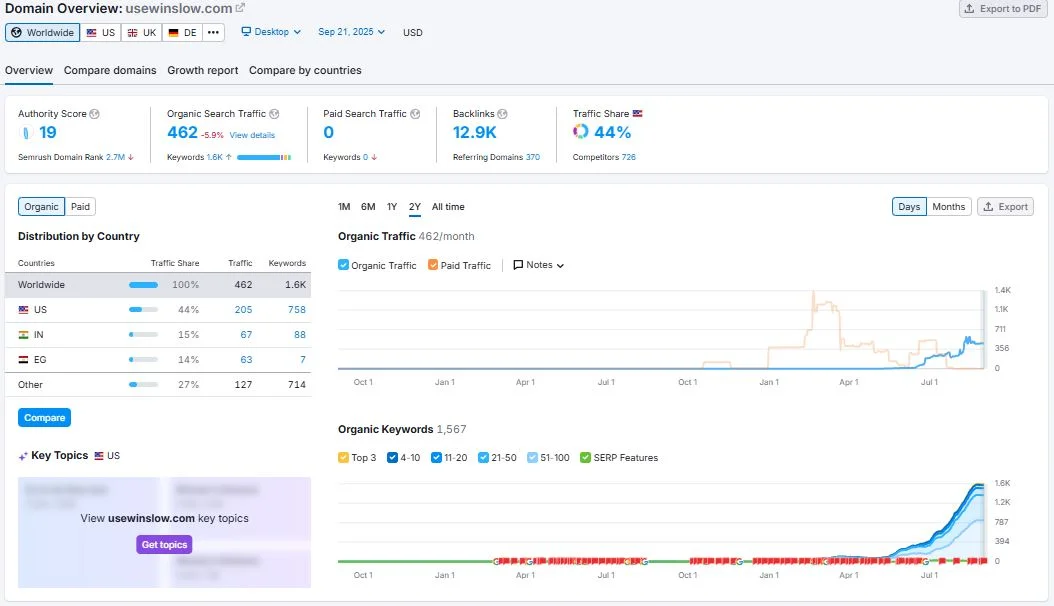
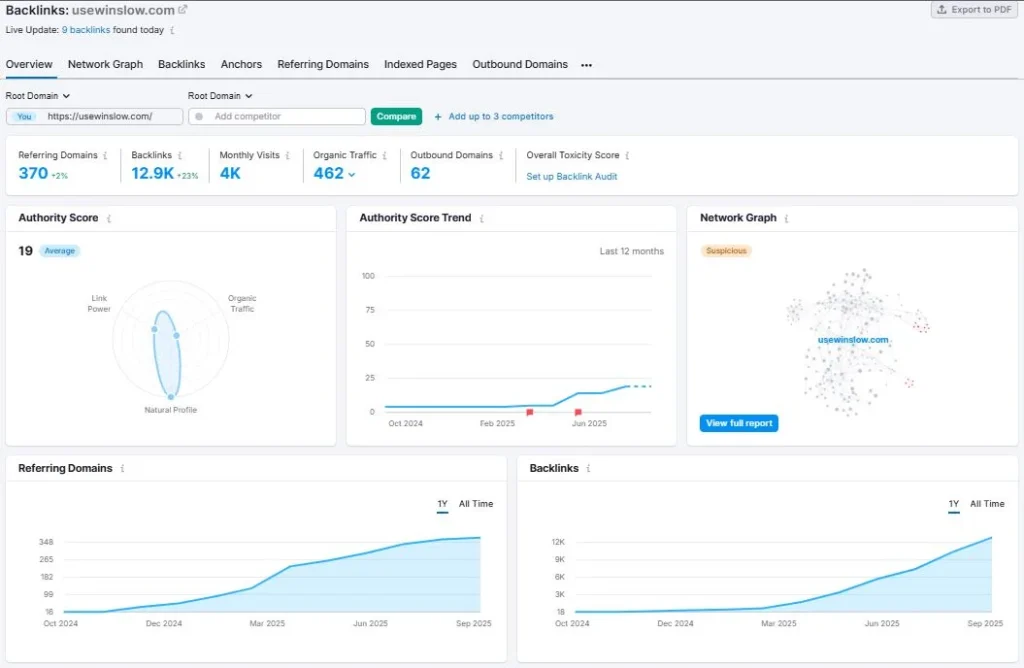
I like to start with four dials: authority, links, organic traffic and country split. Your screenshots give enough to outline the shape.
| Metric | What I saw | Why it matters |
| Authority Score | 19 (labeled “Average”) | Early-stage or mid-tier domain. Credible, not yet a juggernaut. |
| Referring Domains | ~370 | Decent breadth. I care more about variety and velocity than the raw count. |
| Backlinks | ~12.9K | Link volume is high relative to authority → signals a concentration pattern (we’ll unpack below). |
| Organic Visits (monthly) | ~462 | Small but rising; room to grow with keyword clustering and technical cleanup. |
| Outbound Domains | ~62 | Healthy ratio; no sign of excessive outlinking. |
| Network Graph | Flagged “Suspicious” | Usually means clusters of similar anchors or sitewide links; cross-check with the anchor report. |
- US ~44% of organic traffic (205 visits)
- India ~15%
- Egypt ~14%
- “Other” ~27%
This is mostly United States, which matches the HR templates/operations audience. The IN/EG share suggests some template keywords attract global searches; fine, but conversions and language cues should stay US-first unless you plan localized hubs.
Immediate read: the domain is gaining links faster than authority, with organic traffic catching up. That pattern is fine if links are natural and diversified; risky if they’re template/sitewide or repetitive anchors. On to anchors.
Backlinks & Anchors: power, patterns and a red flag or two
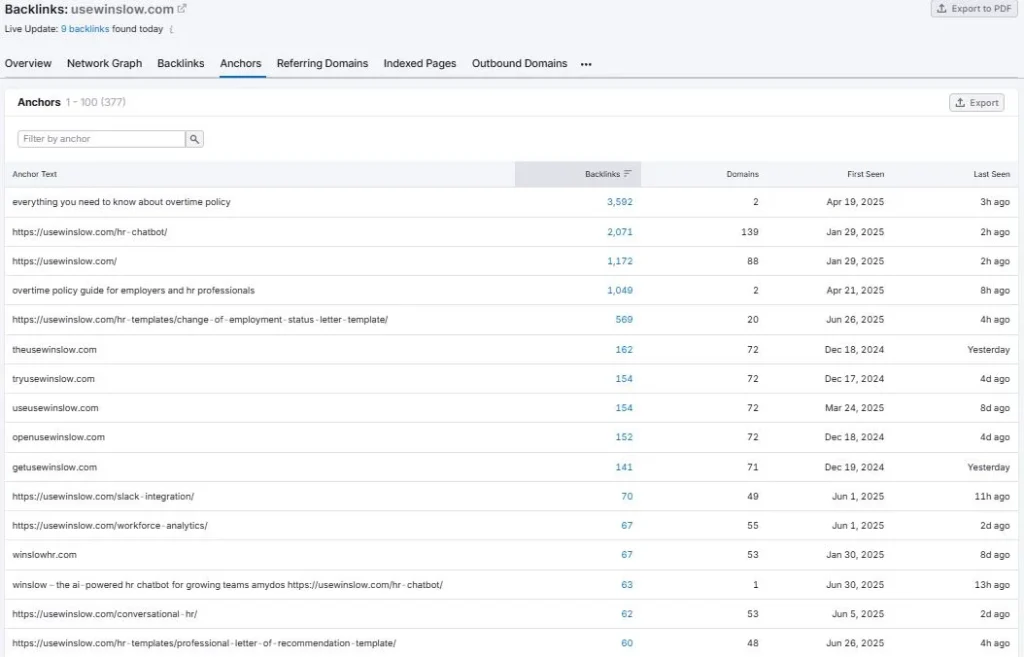
The anchor table tells the story. A handful of anchors dominate:
- “everything you need to know about overtime policy” → 3,592 backlinks from 2 domains.
- /hr-chatbot/ → 2,071 backlinks from 139 domains.
- Homepage URL → 1,172 backlinks from 88 domains.
- “overtime policy guide for employers and hr professionals” → 1,049 backlinks from 2 domains.
- /hr-templates/change-of-employment-status-letter-template/ → 569 backlinks from 20 domains.
- Branded variants like theusewinslow.com / tryusewinslow.com / openusewinslow.com each sit in the 140–160 backlink range from ~70 domains.
What does This Mean in Plain Terms?
Those two overtime-policy anchors with thousands of links from just 2 domains look like sitewide placements (footer/blogroll/sidebar). That explains the “Suspicious” network graph bubble. Sitewide links aren’t toxic by default, but when they carry exact-match, sentence-length anchors, they can cap authority growth and muddy relevance.
- The /hr-chatbot/ URL has breadth (139 domains)—better. If those are contextual mentions, keep nurturing that kind of link.
- The template page for “change of employment status letter” has respectable diversity (20 domains). That page also ranks well (we’ll see it again in the positions).
Anchor mix score
- Brand/URL anchors: good, multiple variants → natural.
- Exact-match keyword sentences: overweighted by a few sitewides → needs dilution through fresher, shorter, branded anchors.
- Deep-link coverage: present (templates, integrations, analytics) → keep it up with more non-template content.
What I would do next?
- Trim or neutralize the two sitewide sentences if you control those partner placements (change to brand or naked URL; move to a single /resources page; nofollow if they must remain sitewide).
- Pursue page-specific editorial links to your best performers (templates with unique utility, HR SOP playbooks, glossary) to balance the profile.
- Publish 3–5 compact case notes (“How an HR SOP cut ticket time 27%”) that third-party blogs can cite. Small stories attract natural, varied anchors.
Organic Visibility: keywords, intent and where to push
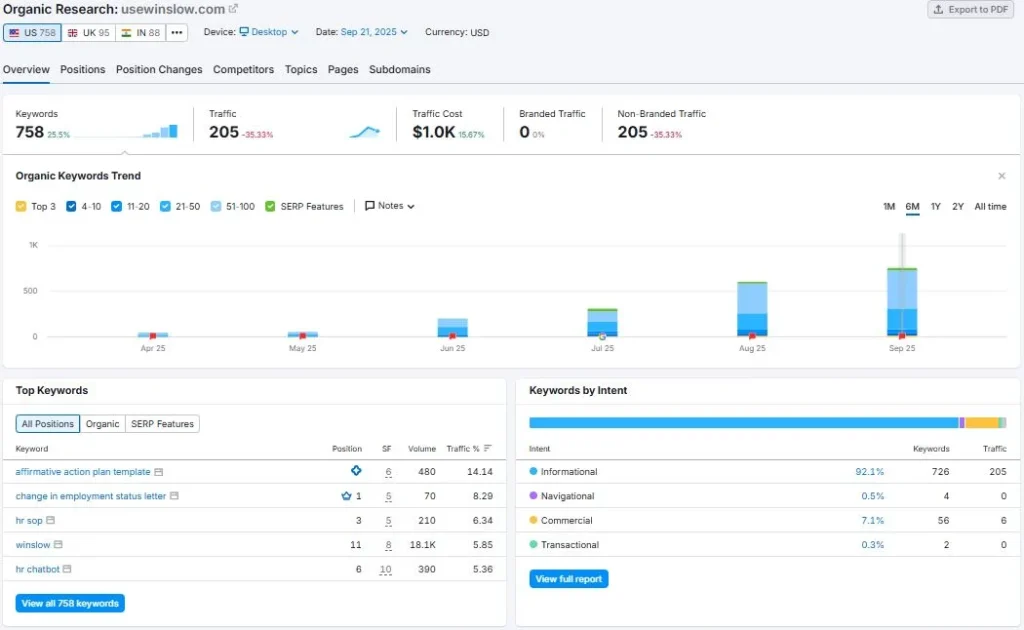
You’re sitting on ~758 tracked keywords, ~205 visits this period (down vs. prior) and a traffic cost around $1.0K. The intent split is the clue I like most: ~92% informational, a small 7% commercial and tiny transactional. That fits the content strategy I see—templates, definitions, SOPs, practical HR docs.
Top movers visible in the screenshot (examples):
- “affirmative action plan template” — position #6, volume ~480, contributes ~14% of traffic.
- “change in employment status letter” — looks like #1 (crown icon), volume ~70, a quiet workhorse.
- “hr sop” — #3 on volume ~210; strong.
- “winslow” (brand) — #11 on ~18.1K volume; within striking distance of page one for the brand term across variants.
- “hr chatbot” — #6 on ~390 volume; good bridge keyword for the product story.
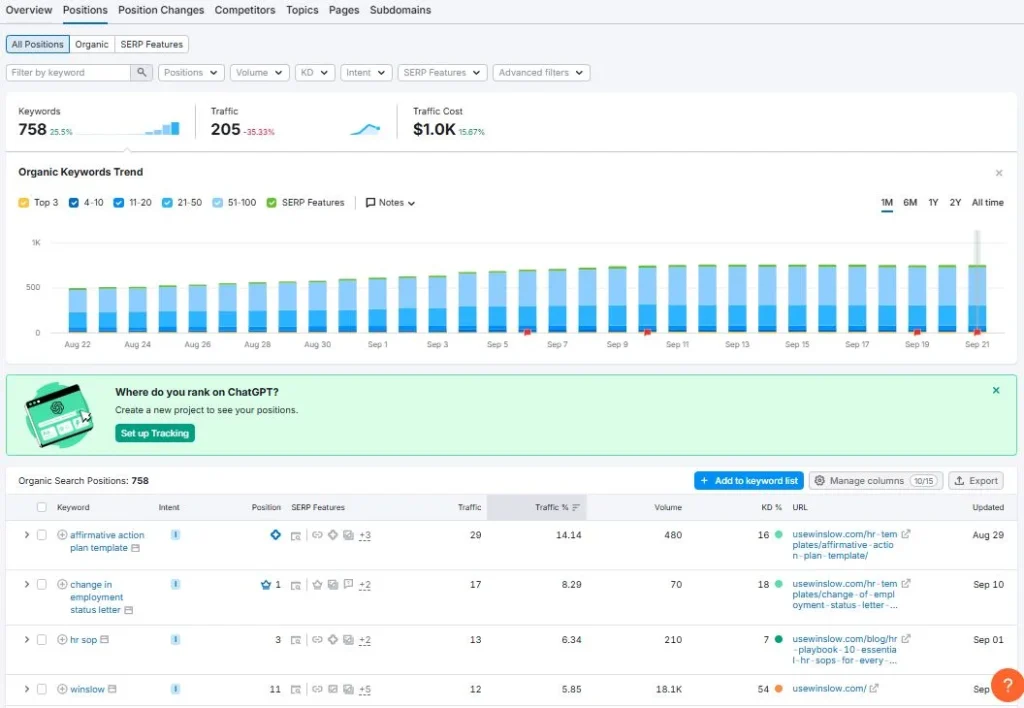
- Positions are steady across the month with a slight climb in the last week—nothing volatile.
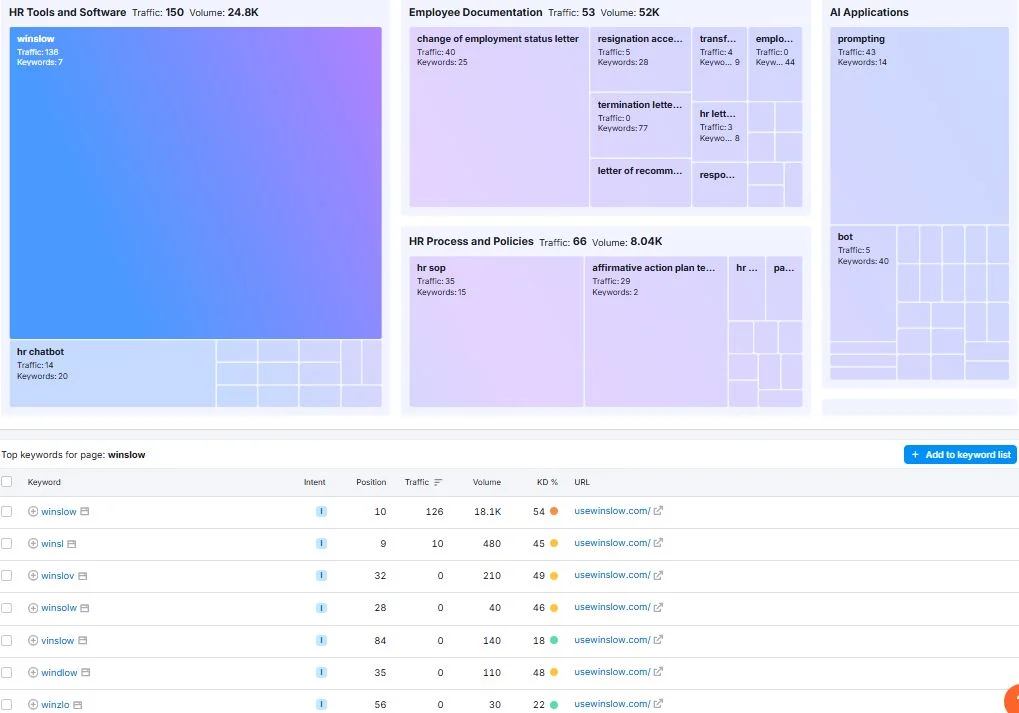
- “Top Page Changes” show the glossary/prompting, affirmative-action template, HR SOPs for every organization, HR templates hub creeping upward. That’s the cluster you should double down on.
Keyword Table I’d Build Campaigns Around
| Cluster | Lead keyword | Current pos. | Volume | Nearest content | Next action |
| HR Templates (Compliance) | affirmative action plan template | 6 | 480 | Template post | Add brief “when to use / when not to use” and 2 legal-adjacent FAQs; internal link from glossary terms |
| Employment Letters | change in employment status letter | 1 | 70 | Template post | Add variants (promotion, reduction, relocation) as sub-templates; capture long-tails |
| Operations SOPs | hr sop | 3 | 210 | SOP guide | Append 3 downloadable SOP skeletons; invite examples from users (UGC for freshness) |
| Conversational AI | hr chatbot | 6 | 390 | /hr-chatbot/ page | Add buyer-side FAQ (“works with Slack/Teams?”, “PII handling?”), showcase short GIF demos |
| Brand | winslow (and misspellings) | 11–32 | 18.1K+ | Home / features | Tighten title tags, add clear sitelinks structure; create a “What is Winslow?” explainer snippet for branded SERP |
Why Did Traffic Dip While Keywords Grew?
The bars show more keywords indexed but lower visit totals this period. That’s classic early-portfolio behavior: lots of new pages ranking in positions 11–30. They don’t deliver until you consolidate content and lift a handful into Top 3. The quickest lifts usually come from:
- Answering the obvious question above the fold with a one-sentence summary users can copy.
- Adding a 4–6 item “what to include” checklist to templates.
- Tightening H1/H2s to match query language (keep it human, but don’t get cute in headings).
- Internal links from glossary/hub pages using short, branded anchors.
Technical health: mobile and layout sanity
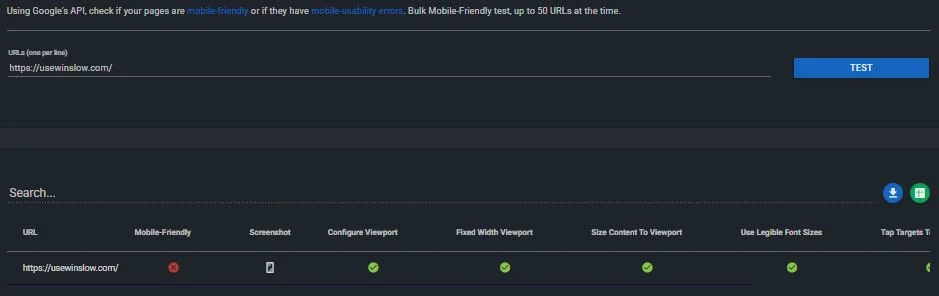
I ran through the mobile checks in the screenshot and then compared that to how the site usually “feels” on a small screen: tap targets, viewport config, font legibility and content scaling.
What the tool shows
- Viewport: configured correctly
- Content: scales to viewport (no side-scroll), legible font sizes, tap targets spaced well
What I Still Watch for in The Wild
- Sticky elements (chat widgets, banners) sometimes overlap CTAs on small iPhones. If your HR template pages run a sticky download ribbon, make sure it doesn’t cover H2s at ~360–400px width.
- Code blocks or tables can creep past the container; a simple overflow-x: auto on pre/code blocks avoids the “zoom dance.”
Quick mobile QA list (do this once per release)
- Open the template hub, a glossary page and /hr-chatbot/ at 375px and 414px widths; scroll and try every CTA.
- Run a keyboard-only pass on mobile (tab order, focus styles); good accessibility reduces pogo-sticking.
- Confirm CLS on first scroll (no layout jumps when fonts load). If you’re using webfonts, turn on font-display: swap.
Table — Mobile fit summary
| Area | Status from screenshot | My note |
| Viewport | ✅ OK | Keep meta viewport minimal; don’t clamp zoom. |
| Content fit | ✅ OK | Watch wide tables on templates. |
| Fonts | ✅ OK | 16px base or higher; avoid thin weights. |
| Tap targets | ✅ OK | Check footer social icons; add :focus-visible. |
Crawlability & Index Controls: robots.txt, sitemap and “please stay out of /wp-admin”
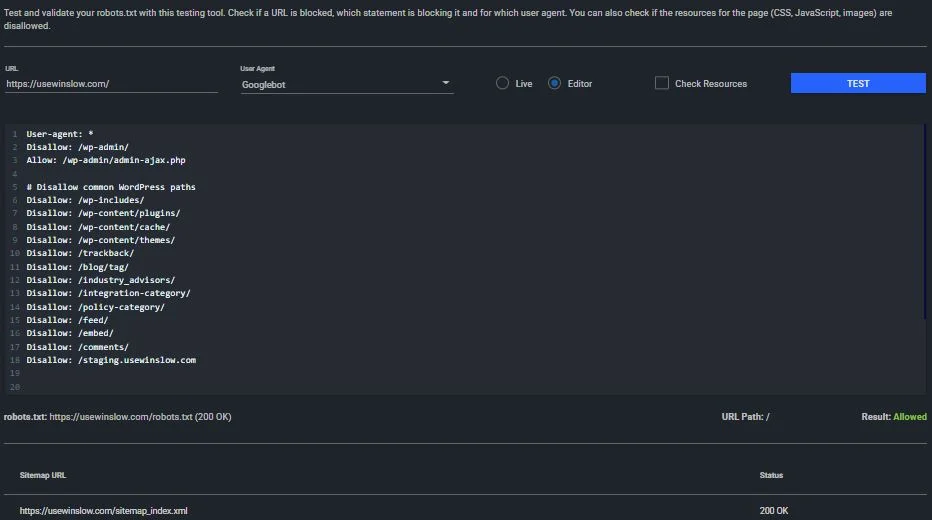
Your robots file looks clean and the sitemap returns 200 OK. The directives mostly fence off WordPress internals and staging—exactly what I want to see.
What’s in Play
- User-agent: * with a broad Allow at the root.
- Disallow for /wp-admin/ (with admin-ajax.php allowed), /wp-includes/, /wp-content/plugins/, /wp-content/cache/, /wp-content/themes/, /trackback/, /feed/, /comments/ and several taxonomy-style paths such as /blog/tag/ and /policy-category/.
- Staging is blocked: /stagings.usewinslow.com — good.
- Sitemap at /sitemap_index.xml is green.
Housekeeping I’d add
- Block thin taxonomy archives you don’t curate (e.g., /category/ if it creates near-empty listings).
- Decide if /embed/ should be indexable; WordPress oEmbed can create duplicates.
- Check that search results pages (e.g., /?s=) are noindex; if not, add a template rule.
- Ensure paginated template lists have rel=“next/prev” (or a view-all) so crawlers don’t treat page 8 as a stand-alone destination.
Crawl budget isn’t your bottleneck at this size, but trimming unhelpful archive pages keeps the index neat and the “site:” queries clean.
Performance: payload, requests and easy wins
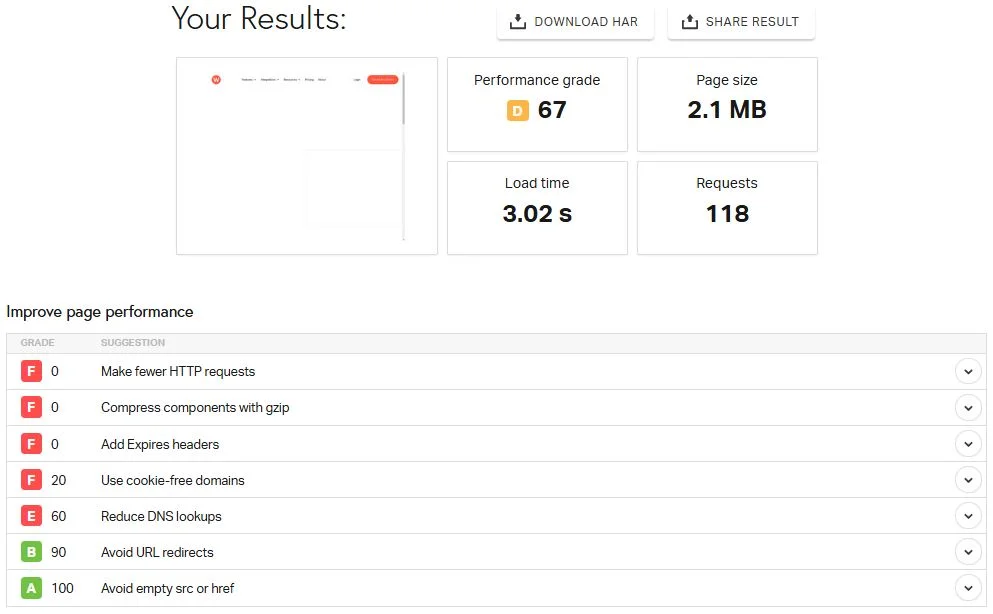
The speed panel gives me enough to set priorities. Page size sits around 2.1 MB, 118 requests, ~3.0s load in the test. The grades flag missing compression, caching and too many requests—classic WordPress stack without aggressive optimization.
What I’d fix first?
- Cut Requests
- Combine critical CSS per template type, defer the rest.
- Cull third-party scripts (chat, analytics duplicates, heatmaps running on every page).
- Sprite or inline tiny SVGs, ditch icon fonts if you can move to SVG.
- Combine critical CSS per template type, defer the rest.
- Turn on Compression & Caching
- Server-level gzip or Brotli.
- Set cache-control / Expires headers for static assets to 30–90 days with file-hashing.
- If using a CDN, make sure it’s actually serving the heavy assets (images, CSS, JS) not just HTML.
- Server-level gzip or Brotli.
- Media Discipline
- Lazy-load below-the-fold images, serve WebP where supported.
- For template pages, move hero images under 120KB and cap width to the container’s max.
- Preload just one hero font weight; let the rest swap in.
- Lazy-load below-the-fold images, serve WebP where supported.
- DNS Lookups
- Consolidate vendors. If you have separate domains for analytics, chat, A/B and fonts, that’s four DNS handshakes before content. Fewer is faster.
Impact vs. Effort Table
| Fix | Impact | Effort | Notes |
| Enable gzip/Brotli | High | Low | One server toggle or plugin setting |
| Cache headers | High | Low | Set on CDN or .htaccess/NGINX |
| Remove unused JS/CSS | High | Medium | Audit theme + plugins; ship per-page bundles |
| WebP + lazy load | Medium | Low | Native in modern WordPress; verify LCP image |
| Reduce third-party calls | Medium | Medium | Keep one analytics, one chat; defer heatmaps |
| Font strategy (swap, fewer weights) | Medium | Low | Preload one, system stack fallback |
| Combine icons into SVG | Low | Medium | Replace font-icons; improve CLS, clarity |
What “good” looks like for this stack
- <1.2 MB initial payload on top pages
- <60 requests at first paint
- LCP <2.0s on mobile for template posts and the /hr-chatbot/ page