Complete Working Operators Reference (2025)
Here’s the definitive list of operators that actually function as of 2025. Status indicators:
- Complete Working Operators Reference (2025)
- How Google Killed It’s Best Features (And Why)?
- The Cache Operator’s Death: September 2024
- The Operators That Actually Still Work
- Site: The King of All Operators
- Title and URL Operators: Intitle, Allintitle, Inurl, Allinurl
- Filetype: The Research Operator
- The Core Refinement Operators Everyone Should Know
- Date Operators: Still Beta After Six Years
- Unreliable Operators: Don’t Waste Your Time
- AROUND(X) — Proximity Search
- Number Range (..) Operator
- loc: and location: Operators
- The Fully Deprecated Graveyard
- Real SEO Workflows: Combining Operators That Actually Work
- Finding Guest Post Opportunities
- Uncovering Competitor Link Opportunities
- Internal Linking Audit
- Content Gap Analysis
- Indexation Troubleshooting
- Competitor Monitoring on Autopilot
- Finding Email Addresses for Outreach
- The Operators You’ll Actually Use (And Why)
- What’s Next for Search Operators?
- Final Tips for Operator Mastery
- The Bottom Line
- Working: Reliable, use confidently.
- Unreliable: Technically functions but inconsistent results.
- Beta: Working but officially experimental.
| Operator | Status | What It Does | Example |
| ” “ | Working | Exact phrase match | “content marketing strategy” |
| – | Working | Exclude terms | python -snake |
| OR or | | Working | Match either term | seo OR sem |
| ( ) | Working | Group operators | (seo OR sem) tools |
| * | Unreliable | Wildcard placeholder | “best * for seo” |
| site: | Working | Limit to domain/subdomain | site:reddit.com SEO |
| filetype: or ext: | Working | Specific file formats | filetype:pdf SEO guide |
| intitle: | Working | Word in page title | intitle:SEO |
| allintitle: | Working | All words in title | allintitle:ultimate SEO guide |
| inurl: | Working | Word in URL | inurl:blog |
| allinurl: | Working | All words in URL | allinurl:guest post guidelines |
| intext: | Working | Word in page content | intext:backlink |
| allintext: | Working | All words in content | allintext:link building strategy |
| before: | Beta | Content before date | before:2024-01-01 |
| after: | Beta | Content after date | after:2024-01-01 |
| .. | Unreliable | Number range | laptop $500..$1000 |
| AROUND(X) | Unreliable | Word proximity | climate AROUND(5) change |
| define: | Working | Word definition | define:algorithm |
| source: | Working | News source (News tab only) | source:nytimes |
| weather: | Working | Weather info | weather:karachi |
| stocks: | Working | Stock info | stocks:googl |
| map: | Working | Map results | map:new york |
| movie: | Working | Movie info | movie:inception |
What you need to remember: Focus on site:, quotation marks, the minus operator, title/URL operators and filetype:. Those five categories handle 95% of practical SEO work. Everything else is either unreliable or for specialized use cases.
Search operators are special characters and commands you type directly into Google’s search bar to filter results. Think of them as Google’s command-line interface. Instead of hoping Google understands what you want, you’re telling it exactly what to look for. The difference between typing “SEO tips“ and intitle:SEO site:reddit.com is the difference between getting 2 billion generic results versus finding actual Reddit discussions about SEO.
How Google Killed It’s Best Features (And Why)?
Let’s rewind. Before Google existed, AltaVista launched in December 1995 with the first real search operators-boolean commands that let power users construct complex queries. By 1998, 45% of professional researchers preferred AltaVista. Then Google showed up with a cleaner interface, better results via PageRank and crucially support for the same operator syntax people already knew.
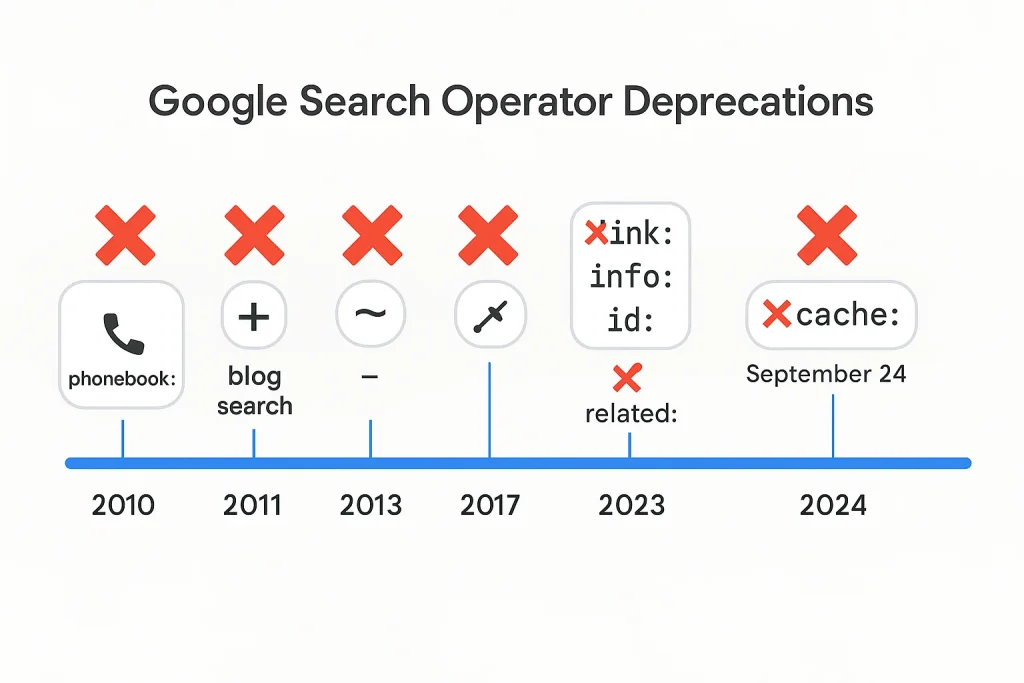
For over a decade, Google expanded it’s operator toolkit. You had cache: for seeing Google’s stored page version. The link: operator showed backlinks. ~ gave you synonyms. + forced exact matches. By 2010, Google was the undisputed search king and operators were essential tools for webmasters and SEO professionals.
Then The Purge Began
November 2010: phonebook: and rphonebook: operators removed due to privacy concerns. The writing was on the wall-Google was moving away from “power user” features.
2011 brought the real bloodbath. The + operator vanished when Google+ launched (they told everyone to use quotes instead). All the blog search operators (inpostauthor:, blogurl:, etc.) disappeared when Google shut down Blog Search in May. The author: operator for Google News? Gone by December.
June 2013: Google killed the tilde operator (~) for synonym searches. Their reasoning? “Low usage.” Translation: most regular users never touched it, so why maintain it?
2017 was the great operator massacre. Google’s Gary Illyes confirmed on Twitter that link:, info: and id: operators were officially deprecated. The SEO community lost critical backlink analysis tools that day. Google’s solution? “Use Search Console instead” conveniently locking users into their ecosystem.
By July 2023, the related: operator (for finding similar websites) got axed. Danny Sullivan, Google’s Search Liaison, explained it “hasn’t really worked that well for some time.” The methodology that compared backlinks and entities across pages was deemed outdated in the AI era.
The Cache Operator’s Death: September 2024
September 24, 2024. The cache operator completely stopped working.
For 25+ years, cache: let you view Google’s stored snapshot of any webpage. SEO pros used it constantly debugging indexing issues, checking how Google rendered JavaScript sites, comparing cached versus current versions, performing competitive analysis. It was irreplaceable.
The timeline tells the story. Cache links started disappearing from search results in December 2023. By January 25, 2024, they were completely gone from snippets. Danny Sullivan posted: “Yes, it’s been removed. I know, it’s sad. I’m sad too. It’s one of our oldest features.” His explanation? Web pages load reliably now, so the feature became unnecessary.
But the operator itself kept working until September 24. That’s when it finally died. Google’s documentation was removed on September 17, redirecting to a changelog: “The cache: search operator no longer works in Google Search.”
Their replacement? Links to the Internet Archive’s Wayback Machine in the “About this result” feature. Announced September 11, 2024, Google partnered with the Internet Archive to provide historical page versions. But it’s not the same. The Wayback Machine doesn’t show you what Google’s crawler saw. It doesn’t help debug indexing problems. It doesn’t tell you when Google last crawled your page.
The pattern is clear: Google removes operators that serve technical users in favor of simplified experiences for mainstream searchers. AI-driven natural language search doesn’t need operators it just needs you to ask questions normally. That’s where this is heading.
The Operators That Actually Still Work
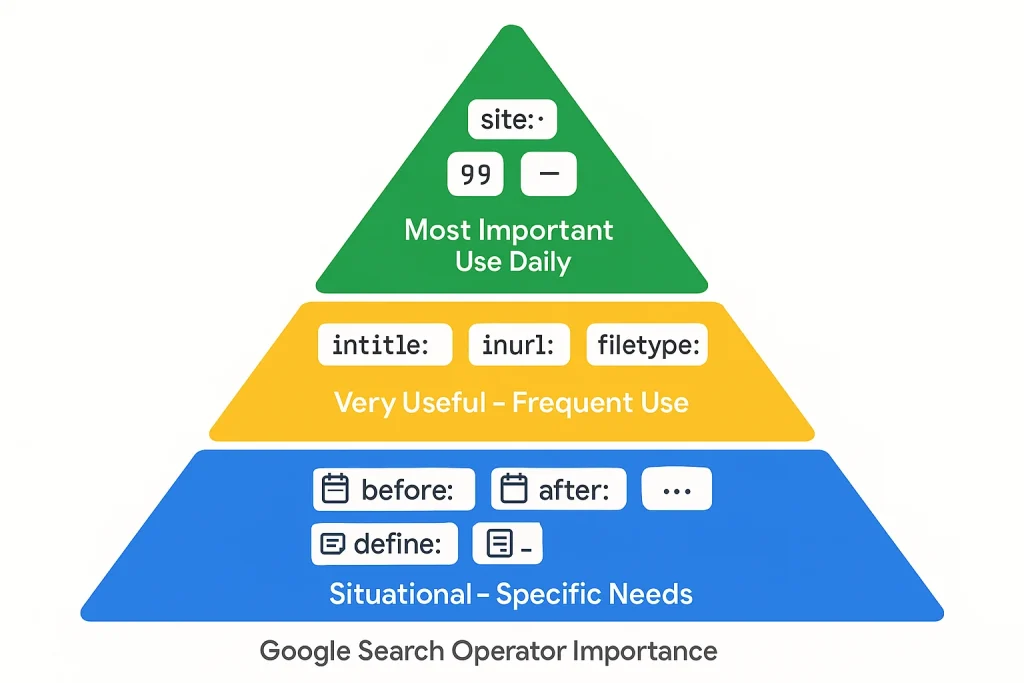
Despite the casualties, roughly 25-30 operators remain functional in 2025. Let’s focus on what matters the operators you’ll actually use.
Site: The King of All Operators
site: is the single most valuable search operator for SEO work. It restricts results to a specific domain or subdomain.
Basic usage:
- site:theseospot.com: shows all indexed pages from your domain.
- site:blog.theseospot.com: only subdomain results.
- site:theseospot.com keyword: indexed pages containing “keyword”.
Why it matters: This is how you check indexation. If Google claims you have 500 pages indexed but site:yourdomain.com only returns 200, you’ve got a problem. You can also use it to find specific content types: site:example.com filetype:pdf shows all indexed PDFs.
Real SEO use case: Want to find your competitor’s resource pages for link prospecting? site:competitor.com inurl:resources or site:competitor.com intitle:“useful links” cuts through the noise instantly.
Google’s official documentation confirms site: remains fully supported. Unlike deprecated operators, this one isn’t going anywhere it serves mainstream users too.
Title and URL Operators: Intitle, Allintitle, Inurl, Allinurl
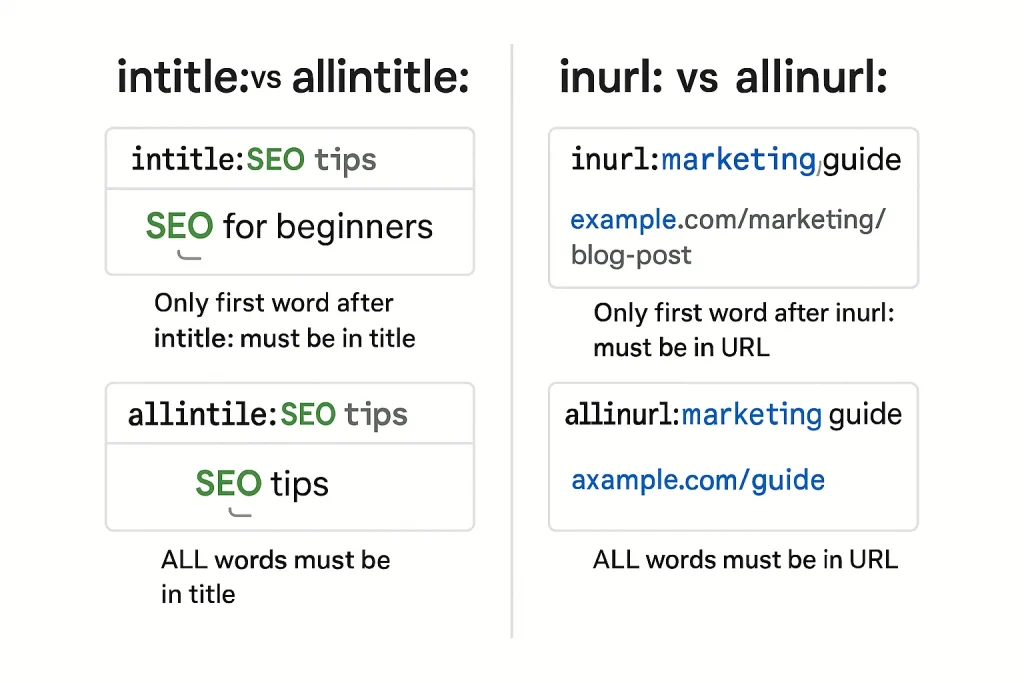
These four operators help you target specific page elements.
Intitle: and Allintitle:
- intitle:SEO: pages with “SEO” in the title.
- allintitle:SEO guide 2025: pages with ALL these words in the title.
The difference? intitle: finds pages where at least one title word matches. allintitle: requires every word to appear in the title (not necessarily in order).
Inurl: and Allinurl:
- inurl:login: pages with “login” in the URL
- allinurl:blog seo tips: URLs containing all these terms
These operators are confirmed working as of 2025 across multiple SEO tool tests.
Filetype: The Research Operator
filetype: (or ext:) finds specific file formats. Essential for content research and competitive analysis.
Supported formats:
- PDF, DOC/DOCX, XLS/XLSX, PPT/PPTX
- TXT, RTF, CSV
- And more obscure formats (SWF, PS, etc.)
Usage examples:
- filetype:pdf SEO strategy: PDF documents about SEO strategy.
- site:competitor.com filetype:xlsx: find your competitor’s spreadsheets (sometimes people accidentally index data files).
- intitle:“index of” filetype:pdf: discover open directories with PDFs.
Why this matters: Researchers use this constantly. If you’re building a data-driven article and need whitepapers, academic research or downloadable resources, this operator is irreplaceable. Plus, it works perfectly with other operators.
The Core Refinement Operators Everyone Should Know
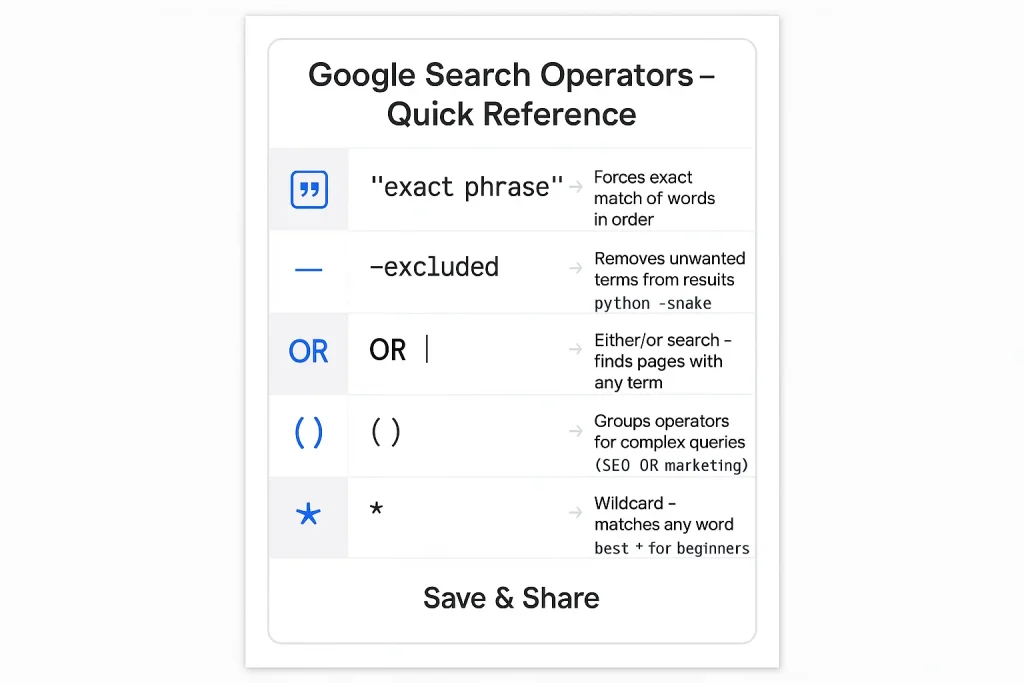
Before we get into advanced tactics, master these fundamental operators. They’re simple but incredibly powerful when combined.
Quotation Marks (” “) The exact match operator. Forces Google to match your phrase precisely, word-for-word, in that exact order. Without quotes, Google interprets your search loosely, including synonyms and variations. With quotes, you get exactly what you typed.
Example: “best SEO tools 2025” only returns pages with that exact phrase. No “top SEO tools,” no “great SEO software” just pages matching your precise wording.
Why this matters for SEO: Finding duplicate content on your site. Try “your exact title” -site:yourdomain.com to see if anyone copied your content. Or check how many competitors use the same headline formula with intitle:“ultimate guide to”.
The Minus Sign (-) Excludes terms from results. No space between the minus and the word you’re excluding.
Example: jaguar -car -automobile gets you results about the animal, not the vehicle. Or site:competitor.com -blog shows their non-blog pages.
Combining exclusions: You can stack multiple exclusions. Python programming -snake -monty eliminates irrelevant results about actual pythons and Monty Python comedy.
OR Operator Shows results matching either term (or both). You can also use the pipe symbol | which does the same thing. Google defaults to showing results containing all your words, so OR explicitly broadens the search.
Example: content marketing OR copywriting finds pages about either topic. Useful when researching related concepts or checking variant spellings: grey OR gray.
Real application: Finding guest post opportunities across multiple niches. Try (digital marketing OR content strategy) intitle:“write for us” to cast a wider net.
Parentheses ( ) Groups operators to control search logic. Essential for complex queries where you’re combining multiple operators.
Example: (seo OR “search optimization”) site:reddit.com finds either term on Reddit. Without parentheses, the logic gets messy.
Wildcard Operator (*) Acts as a placeholder for unknown words in a phrase. Mostly useful in Google Autocomplete rather than standard search. Works inconsistently according to multiple sources, so don’t rely on it heavily.
Example: “best * for SEO” might surface “best tools for SEO,” “best practices for SEO,” etc. But results are hit-or-miss.
Date Operators: Still Beta After Six Years
Here’s something wild: Google introduced before: and after: operators in April 2019. They’re still in beta as of 2025. Six years later. Still labeled as experimental.
How they work:
- before:YYYY-MM-DD – Results published before this date.
- after:YYYY-MM-DD – Results published after this date.
- Combine them: after:2024-01-01 before:2024-12-31 for a specific range.
Format requirements: You must use year-month-day (2024-03-15) or just the year (2024). Danny Sullivan confirmed this on Twitter: “You must provide year-month-day dates or only a year.”
Why they’re still beta: Google struggles with dates. Sullivan explained: “It can be difficult for us to know the exact date of a document for a variety of reasons. There’s no standard way that all site owners use to indicate a publishing or republishing date. Some provide no dates at all on web pages. Some might not indicate if an older page is updated.”
Translation: websites are messy with date metadata. Some sites don’t include dates. Others update old content without changing the published date. Google’s algorithms guess and sometimes they guess wrong.
Real-world use case: Tracking when your competitor published certain content. Try site:competitor.com “link building” after:2024-01-01 to see their recent posts on that topic. Or research how discussions evolved: “ChatGPT” before:2022-11-01 shows pre-ChatGPT launch conversations (spoiler: there weren’t many).
Pro tip: The built-in Google Search Tools date filter might work better. Click Tools → Any Time → Custom Range for a visual calendar interface. It’s less precise but more reliable than the operators.
Unreliable Operators: Don’t Waste Your Time
Not every operator deserves your attention. Some are officially dead. Others technically work but return garbage results. Here’s what to avoid in 2025.
AROUND(X) — Proximity Search
This operator supposedly finds pages where two terms appear within X words of each other. “climate AROUND(5) change” would find “climate” and “change” with up to 5 words between them.
The problem: Multiple SEO sources report inconsistent results. It works sometimes. Other times it ignores the proximity requirement entirely. Even SEO tool companies categorize it as “unreliable” and don’t recommend professional use.
Verdict: Skip it. If you need proximity search, you’re better off using dedicated SEO tools with accurate crawling capabilities.
Number Range (..) Operator
The .. operator filters numeric ranges. camera $200..$500 should show cameras priced between those amounts. Year ranges work too: iPhone 2020..2023.
The problem: Works for some queries but fails unpredictably on others. Results are unreliable enough that SEO professionals avoid depending on it for anything critical.
Better alternative: Use Google Shopping for price ranges or add price filters through the Shopping tab’s interface.
loc: and location: Operators
loc:placename was supposed to limit results to a geographic location. location: did similar filtering for Google News by region.
The problem: Both operators are categorized as unreliable by Google operator tracking sites. Results are inconsistent and inaccurate. Not officially deprecated, but functionally useless.
What to use instead: Google’s location settings or just add the place name naturally to your search query.
The Fully Deprecated Graveyard
These operators are completely dead. Don’t bother trying them:
- cache: Removed September 2024 (we covered this already).
- link: Officially deprecated 2017. Once showed backlinks, now returns sampled junk.
- info: Deprecated 2017. Used to show page metadata, now nearly useless.
- ~ (tilde) Removed 2013. Previously included synonyms.
- + (plus) Removed 2011. Forced exact matches before quotes became standard.
- related: Removed July 2023. Found similar websites.
- phonebook: and rphonebook: Removed 2010 for privacy reasons.
- All blog search operators inpostauthor:, blogurl:, etc. Dead since 2011 when Google shut down Blog Search.
Real SEO Workflows: Combining Operators That Actually Work
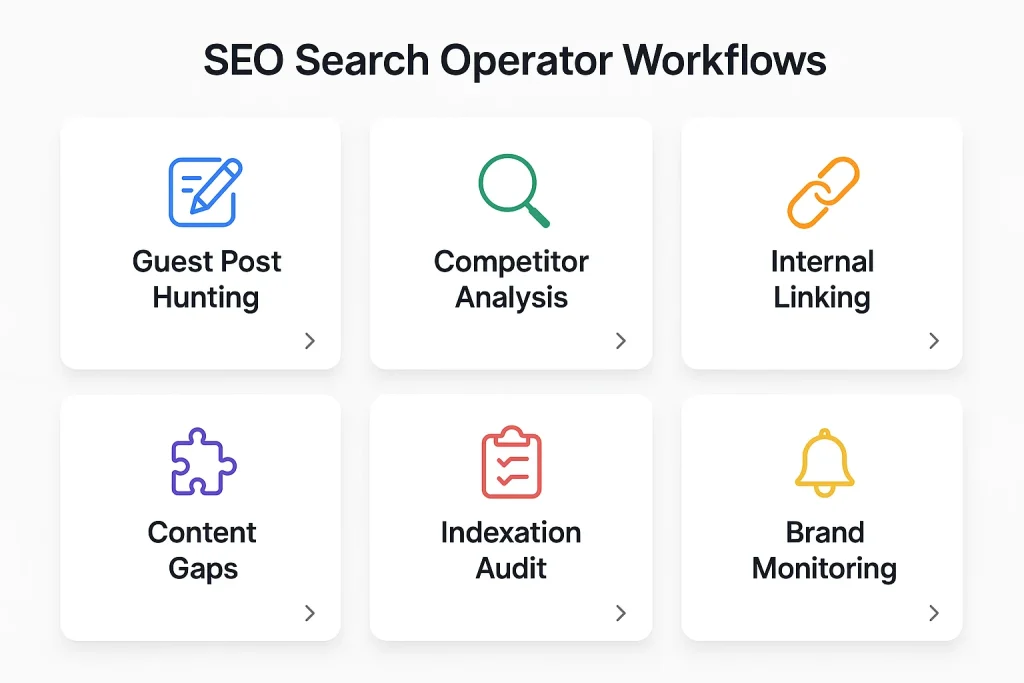
Theory is fine, but let’s get practical. Here’s how to combine operators for actual SEO tasks you’ll use weekly.
Finding Guest Post Opportunities
The classic approach still works, but most people do it wrong. Don’t just search “write for us” that returns thousands of outdated pages.
Better approach:
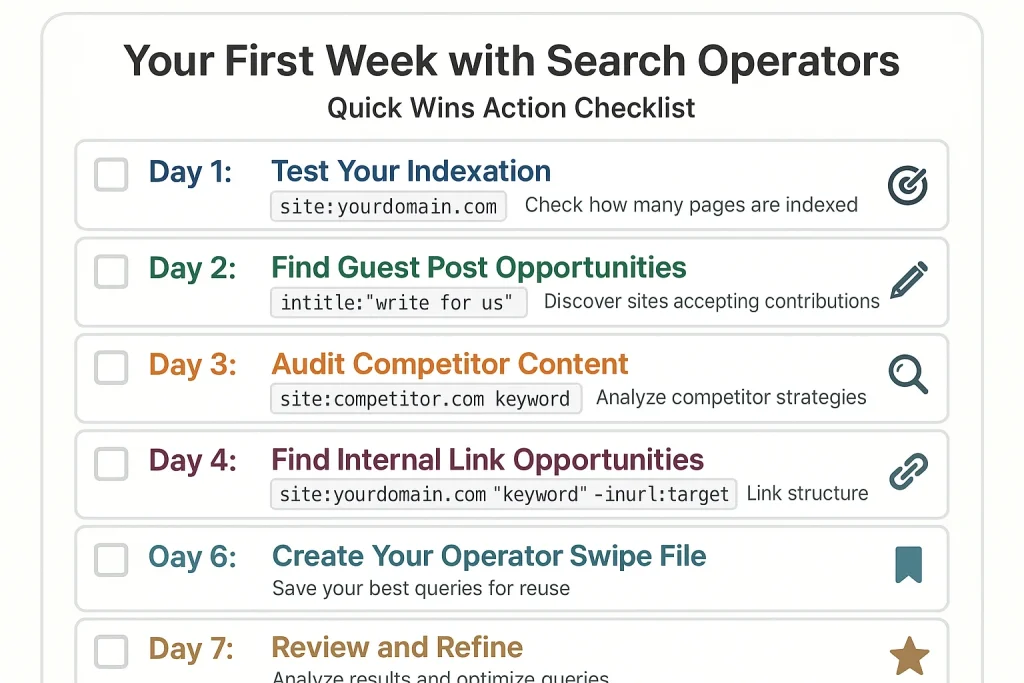
intitle:“write for us” (SEO OR “digital marketing”) -site:medium.com -site:linkedin.com
What this does:
intitle:"write for us":Pages explicitly accepting submissions.(SEO OR "digital marketing"):Multiple relevant niches.-site:medium.com -site:linkedin.com:Excludes low-quality platforms.
Take it further:
inurl:guest-post inurl:guidelines (marketing OR content) site:.com
This finds actual guest post guideline pages (where submissions instructions live) on .com domains only. Sites with published guidelines are more likely to respond since they actively manage guest contributions.
Pro variation for finding active blogs:
site:yourniche.com inurl:blog after:2024-01-01
Filters for blogs in your niche that published recently, meaning they’re actually active. Dead blogs waste your outreach time.
Uncovering Competitor Link Opportunities
Your competitors already did the prospecting work. Why not leverage it?
Find lists that mention competitors but not you:
“best email marketing tools” -yourcompany.com (competitor1 OR competitor2 OR competitor3)
This shows comparison posts, listicles and roundups featuring your competitors. If they’re mentioned but you’re not, you’ve got an outreach target.
Finding competitor resource pages:
site:competitor.com (inurl:resources OR inurl:links OR intitle:resources)
Resource pages are link goldmines. If your competitor earned a spot, you probably can too.
Discovering where competitors guest post:
“author: competitor-founder-name” -site:competitor.com
Manually search for their team member’s bylines on external sites. Those sites accept guest posts and already trust voices in your space.
Internal Linking Audit
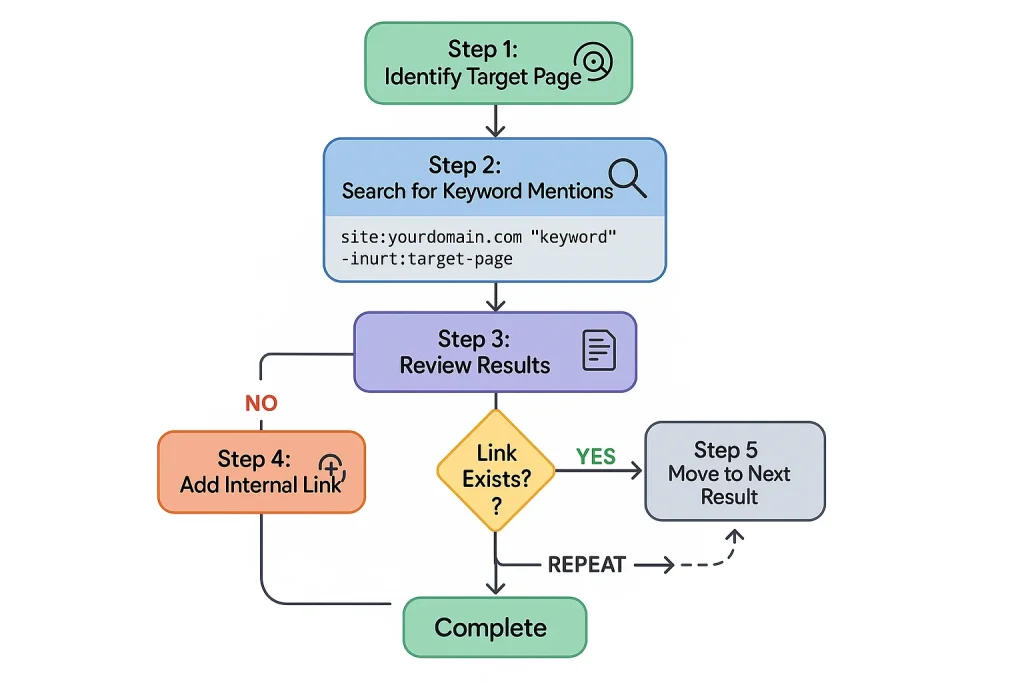
Internal links help Google understand site structure and pass authority between pages. But finding opportunities manually takes forever.
Find unlinked keyword mentions:
site:yourdomain.com “target keyword phrase” -inurl:target-page-url
This shows pages mentioning your target keyword but excludes the page you want to link to. Each result is a potential internal link opportunity.
Example: You published an ultimate guide to link building at /link-building-guide. Search:
site:yourdomain.com “link building” -inurl:link-building-guide
Every result mentioning “link building” (except your guide) could potentially link to it. Open each page, find the mention, add your internal link.
Caveat: This shows both linked and unlinked mentions. You’ll need to manually check if the link already exists. Or use Google Search Console’s internal linking report for more accuracy.
Content Gap Analysis
What topics do your competitors cover that you don’t?
Find their indexed pages:
site:competitor.com intitle:(topic OR keyword) -site:yourdomain.com
This shows competitor pages about a topic, then you verify whether you have similar content.
More surgical approach:
site:competitor1.com OR site:competitor2.com OR site:competitor3.com (keyword phrase) -site:yourdomain.com
Searches multiple competitors simultaneously for a specific topic. The results reveal content gaps in your coverage.
Finding their most linked-to content types:
site:competitor.com (inurl:guide OR inurl:tutorial OR inurl:checklist)
If competitors get links to guides and checklists, maybe you should create similar content formats.
Indexation Troubleshooting
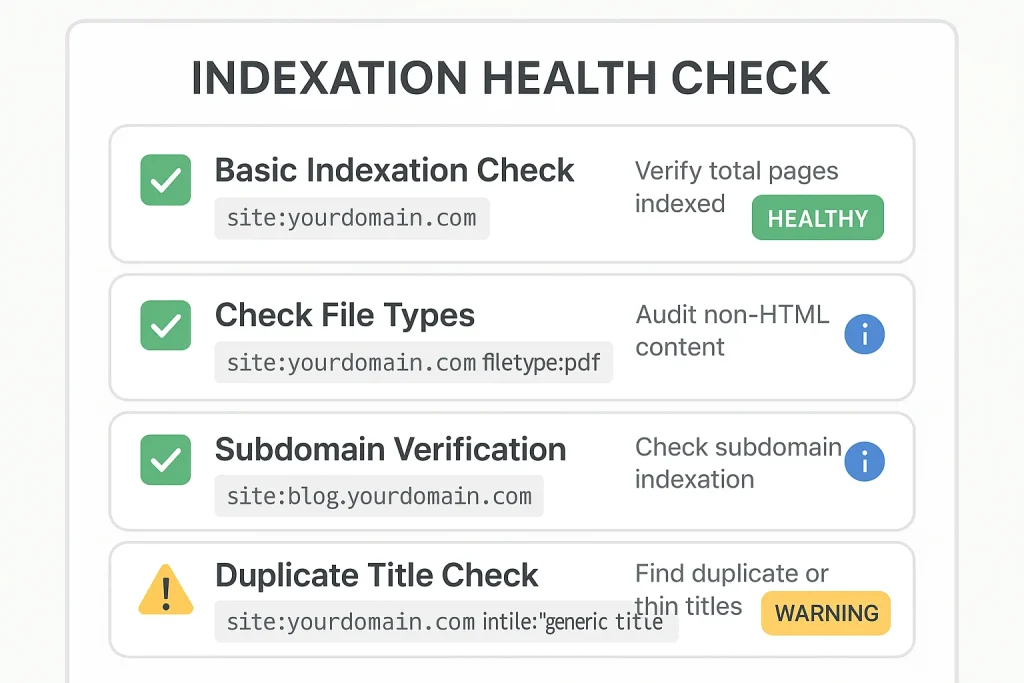
Basic indexation check:
site:yourdomain.com
Compare this number to how many pages you think should be indexed. Massive discrepancy? You’ve got problems.
Find accidentally indexed files:
site:yourdomain.com filetype:pdf
Swap pdf for xlsx, docx, pptx. If you see internal docs, customer data or lead magnets that should be gated? You need to add noindex tags immediately.
Check subdomain indexation:
site:blog.yourdomain.com
Sometimes entire subdomains get deindexed accidentally. This catches it fast.
Find duplicate title tags:
site:yourdomain.com intitle:“your generic title”
If multiple pages share the same title (like “Home” or “Blog”), this surfaces them. Each page needs unique titles for proper SEO.
Competitor Monitoring on Autopilot
Track competitor content:
site:competitor.com after:2024-10-01
Run this monthly to see what they published recently. Adjust the date each time.
Find their new backlinks (sort of):
This is trickier now that the link: operator is dead. But you can still search:
“competitor.com” -site:competitor.com
Shows mentions of their domain on other sites. Not perfect for backlinks, but finds brand mentions, citations and press coverage.
Monitor your own brand mentions:
“yourbrand” OR “your company” -site:yourdomain.com
Finds unlinked mentions places where people reference you but didn’t link. Classic link reclamation opportunity. Reach out and politely ask for a link.
Get granular with specific phrases:
intext:“competitor company name” intext:“partnership” -site:competitor.com
Finds pages mentioning your competitor AND the word “partnership.” Great for discovering partnership/integration opportunities in your space.
Finding Email Addresses for Outreach
Need to contact website owners? Operators help.
Basic approach:
site:targetwebsite.com (email OR contact)
Often reveals contact pages or email addresses embedded on the site.
More creative:
site:targetwebsite.com filetype:pdf
People forget that PDFs often contain email addresses in headers/footers or author info. Download the PDFs, search the text.
Hunting for specific email patterns:
If you know a company’s email format (like [email protected]), search:
“@targetdomain.com” (contact OR about OR team)
Sometimes this surfaces team pages or press releases listing multiple emails.
The Operators You’ll Actually Use (And Why)
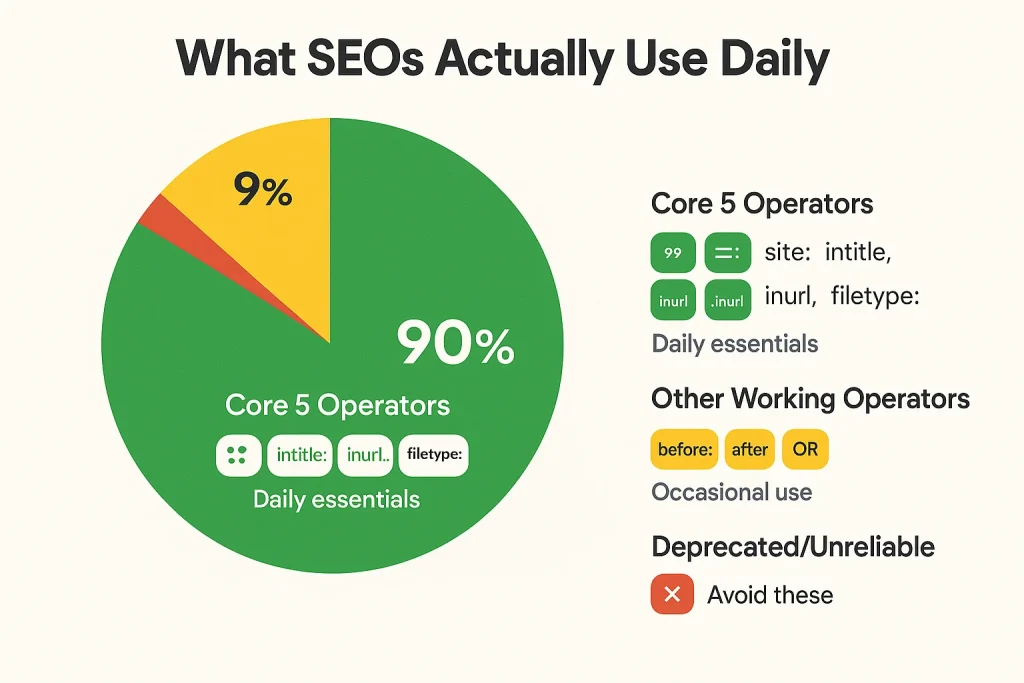
After everything we’ve covered, 90% of your daily SEO work boils down to these combinations:
The Core Five:
site:+ keyword: Domain-specific searches.intitle:+ niche: Finding topic-focused pages.inurl:+ keyword: URL-based filtering.filetype:Resource hunting.- Quotation marks: Exact matching.
Your Go-To Combinations:
site: + intitle: + keyword: Hyper-targeted site searches.site: + -inurl:Exclude sections of sites.intitle: + (keyword OR keyword)Multi-topic searches."exact phrase" + site:Find specific quotes on domains.after: + site:Recent content from specific sites.
Everything else? Situational. Master these five operators and their combinations and you’re ahead of 80% of SEOs who still just Google things normally.
What’s Next for Search Operators?
The writing’s on the wall. Google’s moving away from operators toward natural language AI search. Every major operator deprecation from cache to link to related follows the same pattern: low mainstream usage, replaced by AI-driven alternatives.
Operators likely to survive: The ones regular users actually use. site: for searching specific websites. Quotation marks for exact matches. The minus sign for excluding terms. These serve everyone, not just SEO pros.
Operators on death row: Anything technical or obscure. allinanchor: never worked well anyway. The unreliable operators like AROUND(X) might just fade without official deprecation. And don’t be surprised if before: and after: either get fully integrated or killed entirely being in beta for 6+ years suggests Google doesn’t care much about them.
The real future: Conversational search. Instead of site:competitor.com intitle:marketing after:2024-01-01, you’ll ask “what marketing content did my competitor publish this year?” and AI Overviews will answer. That’s where this is heading.
But we’re not there yet. And even when we are, operators will remain useful for power users who need precision that AI can’t guarantee.
Final Tips for Operator Mastery
No spaces after colons. site:example.com works. site: example.com doesn’t. This trips up beginners constantly.
Test your queries. Operators behave inconsistently based on algorithm updates. What worked last month might not work today. Always verify results make sense.
Combine conservatively. More operators doesn’t equal better results. Start simple, add complexity only when needed.
Save your best queries. Keep a swipe file of operator combinations that work well for your niche. You’ll reuse them constantly.
Use tools for scale. Operators are great for quick manual research. For comprehensive analysis backlink profiles, keyword rankings, competitor tracking invest in proper SEO tools like Ahrefs, SEMrush or Moz. Operators can’t replace professional tooling.
Stay updated. Google doesn’t announce operator changes loudly. Follow Search Engine Land, Search Engine Roundtable and Danny Sullivan’s social media for deprecation news. What works today might be gone tomorrow.
The Bottom Line
Google’s advanced search operators give you surgical precision in an ocean of information. But the trend is clear: Google is simplifying search for mainstream users while technical features get deprecated one by one.
The cache operator? Gone. Link operator? Dead. Related operator? Eliminated. The pattern repeats because AI-driven search doesn’t need manual operators it just needs you to ask questions normally.
But that future isn’t here yet. Right now, operators remain the fastest way to find guest post opportunities, audit indexation, uncover competitor strategies and identify link prospects. They’re free, they’re powerful and if you’re doing SEO in 2025, you need to know them.
Just don’t get too attached. Google giveth and Google taketh away. Use operators while they’re available, but build your SEO strategy on more stable foundations great content, solid technical SEO and relationships that don’t depend on special search syntax.
The cache operator lasted 25 years before Google killed it. How long will the rest survive? That’s anybody’s guess.