

Does Server Location and Speed Actually Impact Your Search Rankings?
Server location is where your website’s hosting server physically sits. Speed, in this context, isn’t just how fast a page loads visually but how quickly the server responds to a request before anything else can even begin. The metric for that is called Time to First Byte and it’s the single most te
 Ahsan SoomroHead of SEO10 min read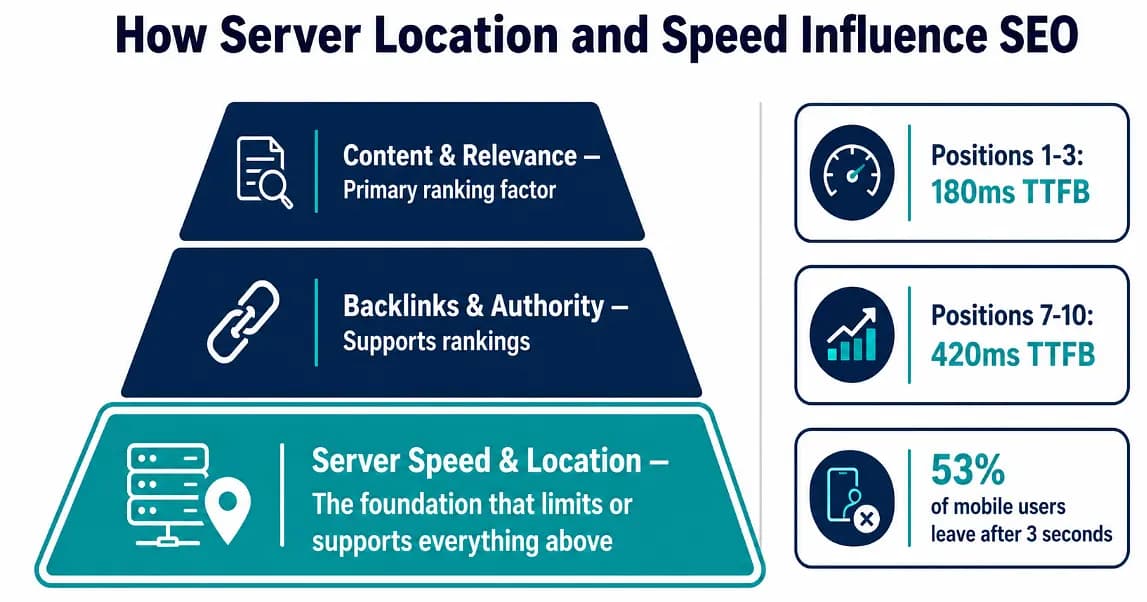
Server location is where your website’s hosting server physically sits. Speed, in this context, isn’t just how fast a page loads visually but how quickly the server responds to a request before anything else can even begin. The metric for that is called Time to First Byte and it’s the single most telling number when you’re trying to figure out if your hosting is holding your SEO back.
How Server Location and Speed Influence SEO
Server location and speed are not primary ranking factors on their own. They’re part of a technical foundation that either supports or quietly limits everything else in your SEO. Google has confirmed page speed as a ranking signal since 2010 and doubled down with Core Web Vitals in 2021, but relevance and content quality still outweigh raw speed. Where server performance genuinely matters is in crawl efficiency, user experience metrics, and conversion rates — and in competitive niches where multiple pages answer the same query with similar quality, it becomes the tiebreaker.
Most SEO budgets go toward content and backlinks and keyword targeting. Makes sense. But the server underneath all of that affects how Google crawls your site, how fast pages load for real users, and whether your Core Web Vitals pass or fail. Small businesses typically spend seven fifty to two thousand a month on SEO services and a slow server can quietly undermine all of that spend without anyone noticing until rankings start slipping.
Does Server Distance Actually Affect Page Speed?
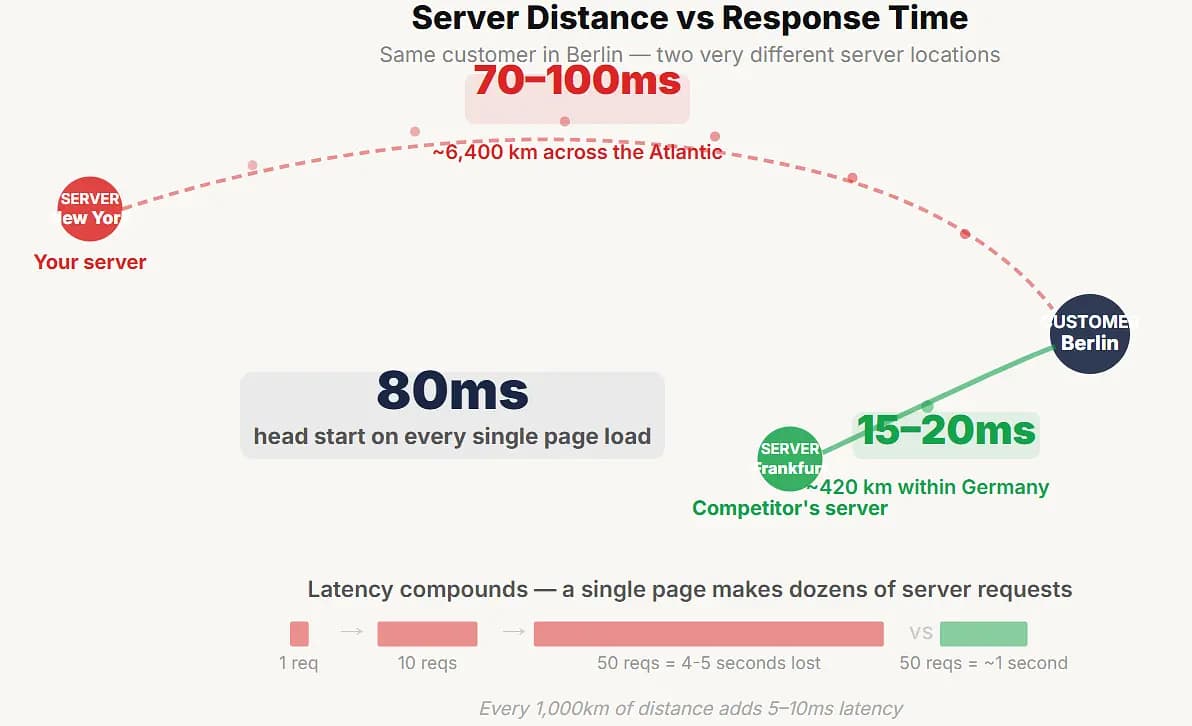
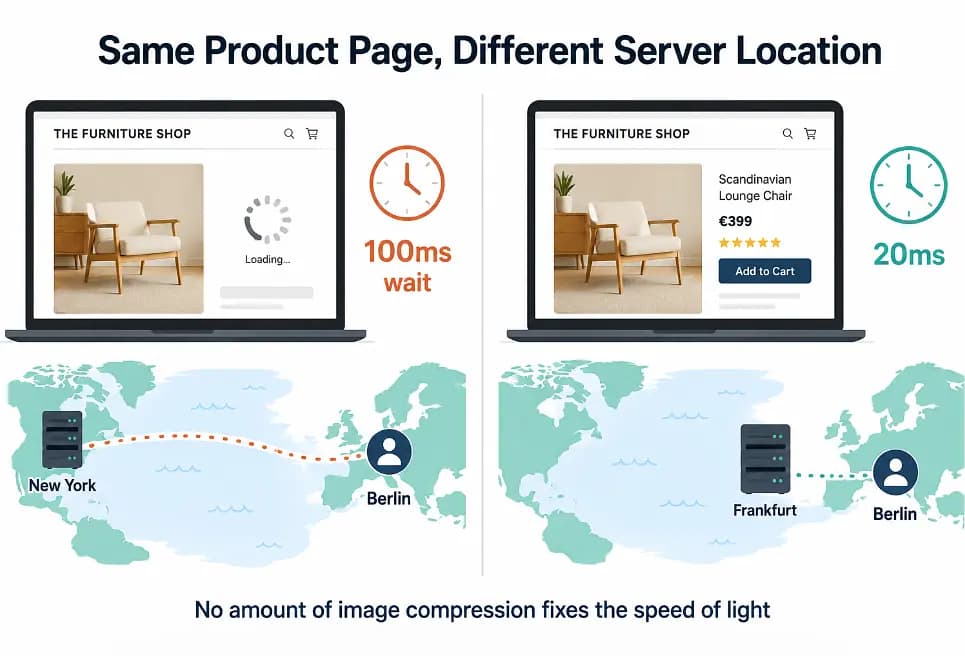
Say you sell handmade furniture online and most of your buyers are in Germany and the Netherlands. You signed up with a hosting provider whose servers are in New York because that’s where the company was based and you didn’t think about it at the time.
Every time someone in Berlin opens your product page, that request crosses the Atlantic Ocean to New York, gets processed, and travels all the way back. Just the round trip on physics alone adds seventy to a hundred milliseconds before the server even starts building the page.
Your competitor has their server in Frankfurt. Their Berlin customers get that initial response in fifteen to twenty milliseconds. They’re starting eighty milliseconds ahead of you on every page load and no amount of image compression or code minification fixes that because the bottleneck is the speed of light through fiber optic cable.
Every thousand kilometers of physical distance between server and user adds roughly five to ten milliseconds of latency. Sounds small until you realize a single page makes dozens of requests and that latency compounds on each one.
What Is TTFB and Why Should You Check It First
TTFB measures the time between a user requesting your page and their browser getting the very first byte of data back. Everything on the page, every image and script and stylesheet, waits behind that first byte.
Google’s guidance says good TTFB is 0.8 seconds or less. Anything over 1.8 seconds is poor.
But the real-world data tells a sharper story. A study that analyzed ten million search results in late 2025 found:
- Sites ranking positions 1–3 had a median TTFB of 180ms
- Sites ranking positions 7–10 sat at 420ms
That’s correlation not causation but it held consistent across industries. And it makes practical sense — if your server takes a full second to respond, your LCP can’t realistically hit the 2.5 second threshold Google wants because everything downstream is already delayed.
Is Server Speed a Major Ranking Factor
Honest answer — it’s not going to take a weak site and push it to page one.
Server speed and location are add-ons. They’re part of a wider technical foundation that either supports or quietly undermines everything else you’re doing in SEO. If your content is thin and your backlink profile is empty, a fast server in the perfect location won’t save you.
But in competitive niches where ten pages answer the same query with similar depth and similar authority, speed becomes what separates position three from position seven. Google’s John Mueller said Core Web Vitals are “more than a tie-breaker but don’t replace relevance.” Gary Illyes at Pubcon 2023 said most sites won’t see a huge benefit from working on them. The truth sits somewhere in between and depends entirely on how tight the competition is in your space.
Where server speed does have a direct measurable impact regardless of niche:
- Crawl budget. Google has said explicitly that slow servers get crawled less frequently. If your server responds slowly Googlebot backs off to avoid overloading it. For a twenty page brochure site this doesn’t matter. For an ecommerce store with fifty thousand products it means your new pages sit in a queue waiting to be discovered.
- User behavior. Google’s own research on over nine hundred thousand mobile pages found that going from one second to three seconds load time increases bounce probability by 32%. At five seconds it jumps to 90%. People leave before the page finishes and that behavioral signal feeds back into rankings.
- Conversion rates. Vodafone ran an A/B test where the only difference was page speed. A 31% improvement in LCP led to 8% more sales and 15% better lead-to-visit rate. BBC found they lost 10% of users for every additional second of load time.
So it’s not a magic switch. But it’s a multiplier on everything else.
Does a CDN Fix the Distance Problem?
A CDN caches your static files, images and CSS and JavaScript and fonts, on servers spread around the world. When someone in Singapore requests your page, those static assets come from a nearby edge server instead of crossing the planet to your origin in London.
That fixes a lot. But not everything.
Dynamic content still goes back to your origin server every time. Cart calculations, login states, checkout flows, database queries, server-side rendering.
A CDN doesn’t touch those. So your origin server location still matters for anything that isn’t a static file sitting in cache.
Bunny.net
Averaging around 24 to 25 millisecond global latency with 119 plus edge locations. Independent benchmarks show it running 15 to 30% faster TTFB than Cloudflare Pro in Europe and the Middle East. Pay as you go pricing, no bandwidth throttling on standard plans. If pure delivery speed at the lowest cost is what you need this is the one to look at.
Cloudflare
Protects roughly 20% of all websites on the internet which tells you something about scale. Best free tier in the market. Strongest security layer with DDoS protection, WAF, bot management, and scraping prevention built in. If you’re running a static content site or a service business and your main concern beyond speed is keeping scrapers and attacks off your site, Cloudflare makes the most sense. The tradeoff is that because so many sites run through it the shared infrastructure can mean slightly higher latency during peak loads compared to smaller dedicated networks.
Fastly
Built for real-time. Cache purging happens in about 150 milliseconds globally which is why Shopify uses it as their CDN backbone. Best for media sites, news publishers, and any setup where content changes frequently and stale cache is a problem.
What About Shopify?
If you’re on Shopify you already have a CDN built into the platform. Shopify uses Cloudflare and Fastly under the hood. Static assets get served from edge locations automatically with Brotli compression, HTTP/3, and TLS 1.3. You don’t configure any of this, it just works. The speed problems on Shopify stores almost always come from app bloat and heavy themes, not server or CDN issues. Most stores sit between 3.2 and 4.5 seconds LCP out of the box once apps pile up and a realistic target after cleanup is around 2.2 seconds on mobile.
Why Haven’t You Set Up Caching Yet?
This one surprises me every time. There are people spending money on server upgrades and CDN subscriptions who haven’t enabled basic page caching on their WordPress site. It’s literally the easiest speed win available and it takes about ten minutes.
Caching creates a static version of your pages so the server doesn’t have to rebuild them from scratch on every visit. Instead of running PHP and querying the database for every single request it just serves the pre-built version. The difference is dramatic, often cutting page generation time by 50 to 70%.
For WordPress:
- WP Rocket — fifty nine dollars a year, works on any host, installs and configures itself automatically. Almost never breaks anything. If you don’t want to think about it this is the answer.
- I might consider using GPL version if I my site is not earning or a high traffic website.
- LiteSpeed Cache — free and incredibly powerful but works best on LiteSpeed servers. If your host runs LiteSpeed this is the obvious choice because it does server-level caching that PHP-based plugins can’t match.
- W3 Total Cache — free, most configurable, also the most common cause of white screen errors when misconfigured. Powerful in the right hands, dangerous in the wrong ones.
For plain PHP sites it’s even simpler. You can implement basic output caching with a few lines of code that store rendered HTML in files and serve those instead of processing every request fresh. Most PHP frameworks have caching built in that just needs to be turned on. Like CI it has application cache options via controller.
Media caching is the part almost nobody sets up despite it being the easiest piece. Setting proper cache-control headers on your images and static files so browsers don’t re-download them on every visit. On WordPress any of those plugins above handle it. On a custom PHP site it’s a few lines in your .htaccess or nginx config. Takes two minutes and immediately reduces repeat-visit load times.
Where Your Server Should Actually Be
Host near your largest revenue-generating audience. Not where your business is registered.
- UK-only business? Server in the UK or Western Europe, CDN like Bunny or Cloudflare on top for static assets.
- US-focused? US East or US Central covers the widest audience with acceptable latency to both coasts.
- Selling globally? Origin server in your biggest market, CDN handles the rest.
If you’re comparing VPS providers check where their data centers actually are before buying. Most providers have multiple locations across continents so you can pick the one closest to your users.
Contabo is worth a specific mention here because they’re the cheapest serious VPS option on the market right now. A plan starting around four fifty euro a month gets you four vCPUs, eight gigs of RAM, and a hundred gigs of NVMe. That same spec costs three to four times more at most other providers.
I don’t have any affiliation or they are paying me here to promote them, it’s just the fact and my persoanl experience.
Their data center locations:
- EU (Nuremberg/Munich) — included free with every plan
- US East (New York), US West (Seattle), US Central (St. Louis)
- UK (Portsmouth)
- Singapore, Japan, Australia — small monthly fee on top of base plan
They’ve been operating since 2003, over two hundred twenty five thousand customers, massive European user base built specifically on that pricing. Not a fly-by-night operation.
One genuinely useful thing during signup — Contabo shows your real-time latency to each data center before you commit. You see your actual ping to Frankfurt versus New York versus Singapore and make a decision based on numbers, not guesswork. You can find Contabo coupon codes and check their current packages because they run different deals and tiers at different times. If you’ve got room to wait before buying, worth checking back for the best deal on what you need.
If I would have not used Contabo or like switching my second option is SHACK HOSTING.
What Happens When You Switch Servers
Most decent VPS providers include automated daily backups or snapshot features. If you’re migrating to get closer to your audience, a reliable backup means you can test the new location without putting your live site at risk.
Nine out of ten site migrations fail to improve SEO when done badly. Mostly botched redirects and broken URLs, not the server change itself. The actual move is the easy part.
For ecommerce specifically — don’t host far from your checkout audience. Slow basket and payment pages directly kill revenue and no front-end trick makes up for a server sitting on the wrong continent.
Does Fixing Your Server Actually Move Rankings
Server location and speed won’t transform your rankings on their own. If someone tells you moving your server will shoot you to page one they’re overselling it. Please avoid such tricks it’s just waste of money.
What it does is remove a ceiling. If your TTFB is sitting at eight hundred milliseconds because your server is on the wrong continent or your hosting is oversold shared infrastructure, then your page speed optimization work hits a wall that no amount of image compression or script deferral can break through. Fix the server foundation and suddenly all those other optimizations actually have room to work.
Think of it as the difference between running on pavement versus running on sand. The pavement doesn’t make you faster by itself. But it stops something from making you slower.
Share
You may also like
Send me your site
I'll tell you honestly what's broken. If we can't help, I'll tell you who can.
Free · 45 min · no obligation