


WPXPO.com — My SEO Field Notes (and Why I’m Skeptical)
I pulled the panels, stared at the charts and something didn’t add up, Big authority and Small traffic of WPXPO.com. Anchors that read like a CMS error log. The kind of mismatch that makes me lean in and ask: is the footprint organic or is the site standing on rickety signals? How I audit: eyes […]
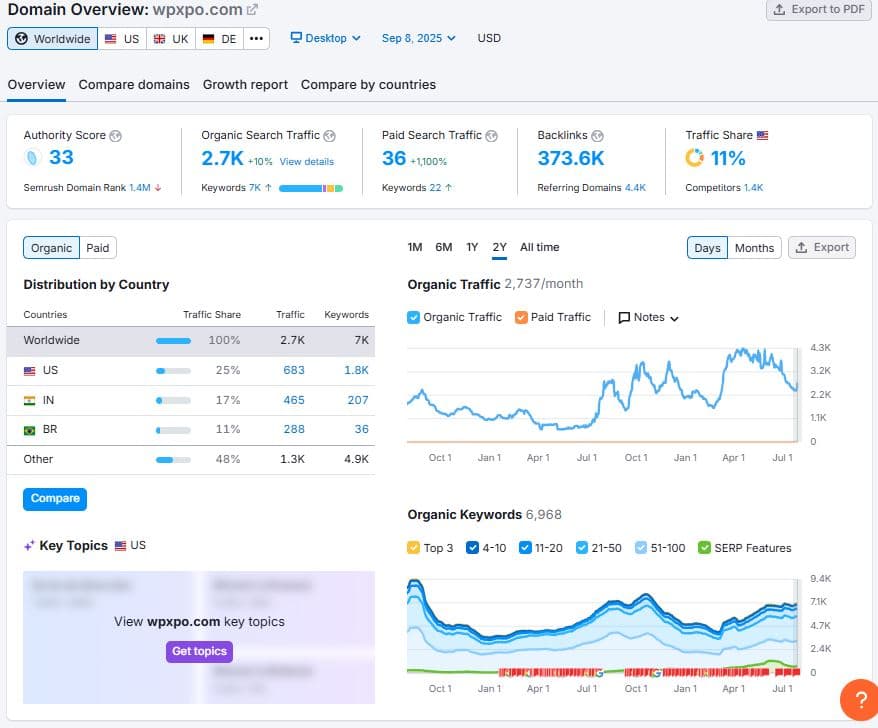
I pulled the panels, stared at the charts and something didn’t add up, Big authority and Small traffic of WPXPO.com. Anchors that read like a CMS error log. The kind of mismatch that makes me lean in and ask: is the footprint organic or is the site standing on rickety signals?
How I audit: eyes on screenshots, gut check against experience, then a paper trail of what I’d verify next. No fluff.
Snapshot: Strong DR, Thin Outcomes
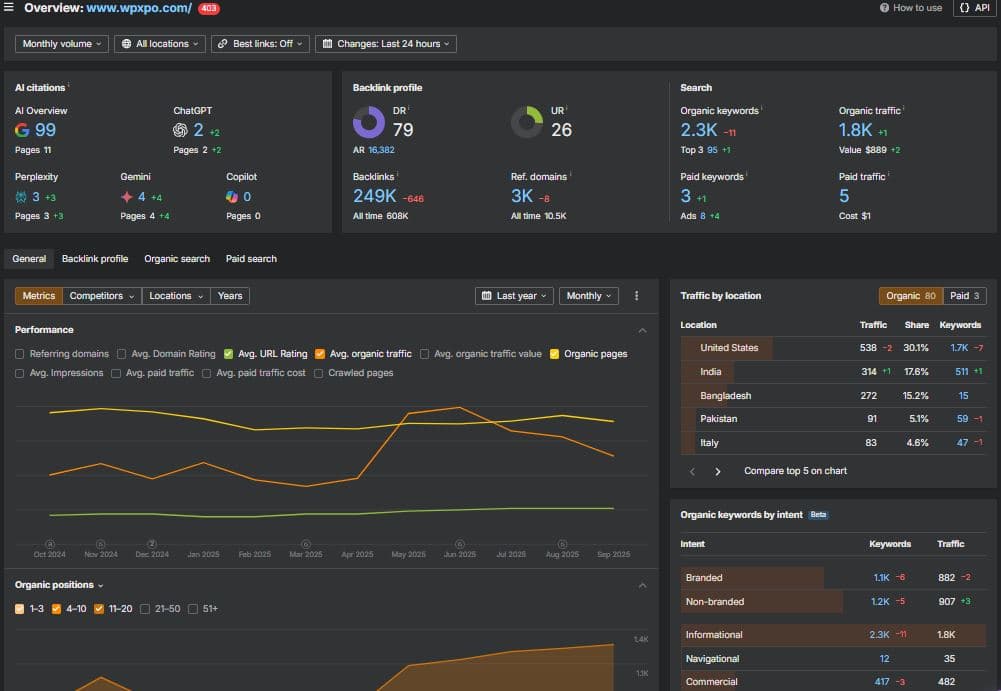
What I See Right Now?
-
Domain Rating sits around 79 (Ahrefs).
-
Backlinks in the ~248–249K range, from ~3.0K referring domains.
-
SEMrush shows ~2.7K monthly organic visits on desktop, ~7K organic keywords, Authority Score roughly 33 of WPXPO.com.
-
US is about a quarter of traffic; India and Brazil follow.
-
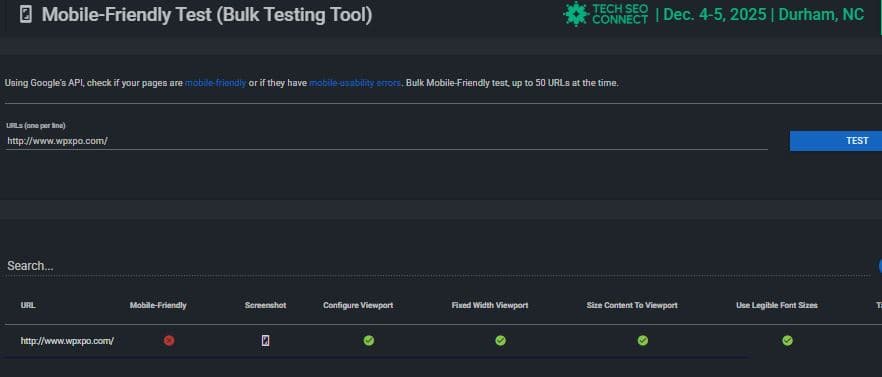
Mobile check throws a “not mobile-friendly” for the homepage in a bulk test, even though a separate speed test grades A 92 with a ~359 ms load. Fast… but flagged. That contradiction is a clue.
Quick Pulse Table
Area
Metric
Value
Authority
Ahrefs DR
~79
Links
Backlinks
~248–249K
Links
Referring Domains
~3.0K
Visibility (SEMrush)
Organic Visits / mo
~2.7K
Keywords
SEMrush Organic Keywords
~7K
Mobile
Google bulk test
Homepage = Not mobile-friendly
Speed
Pingdom-style test
Grade 92 (A), ~359 ms, 470 KB, 34 req.
Why I’m Skeptical?
A DR near 80 with only ~2–3K monthly visits is out of proportion for a legitimate, widely linked WordPress product brand. Not impossible—just uncommon. When that happens, I usually find one (or more) of these:
-
Anchor-text pollution that gives Google no semantic confidence.
-
Links that exist, but don’t mean much (templates, image hotlinks, scraper pages).
-
Technical or intent problems that choke rankings on money pages.
Link Profile: Real Authority, Weird Semantics
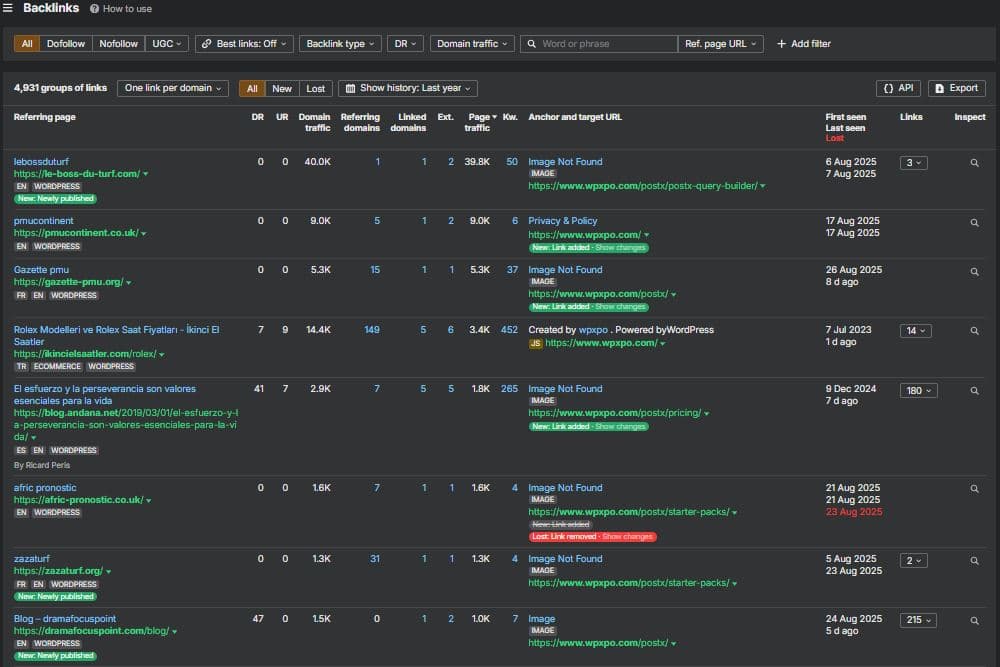
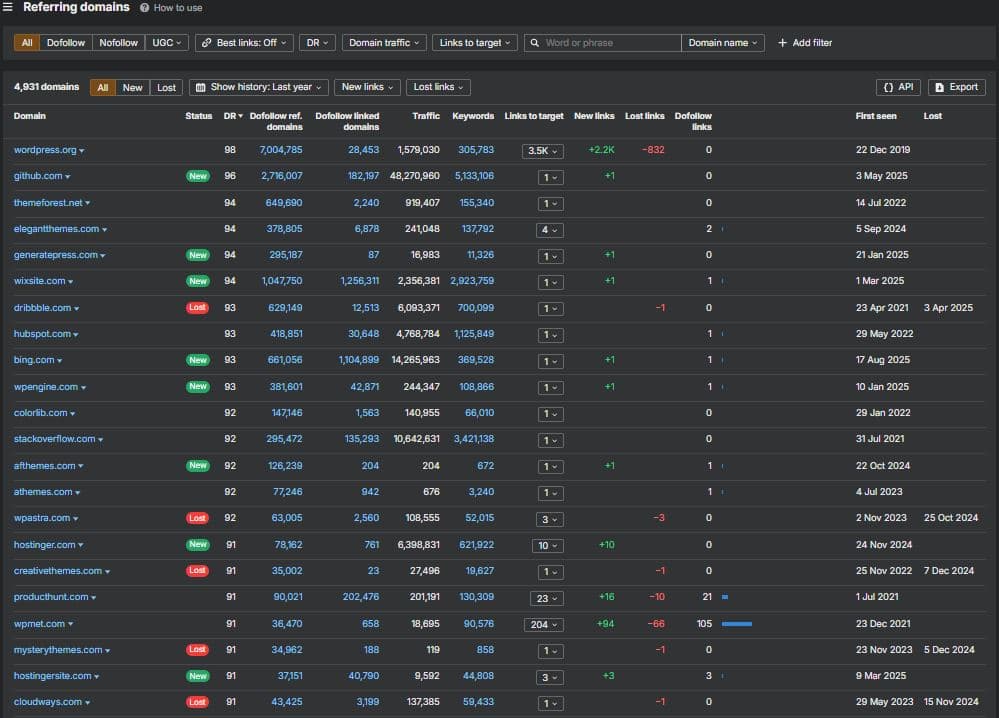
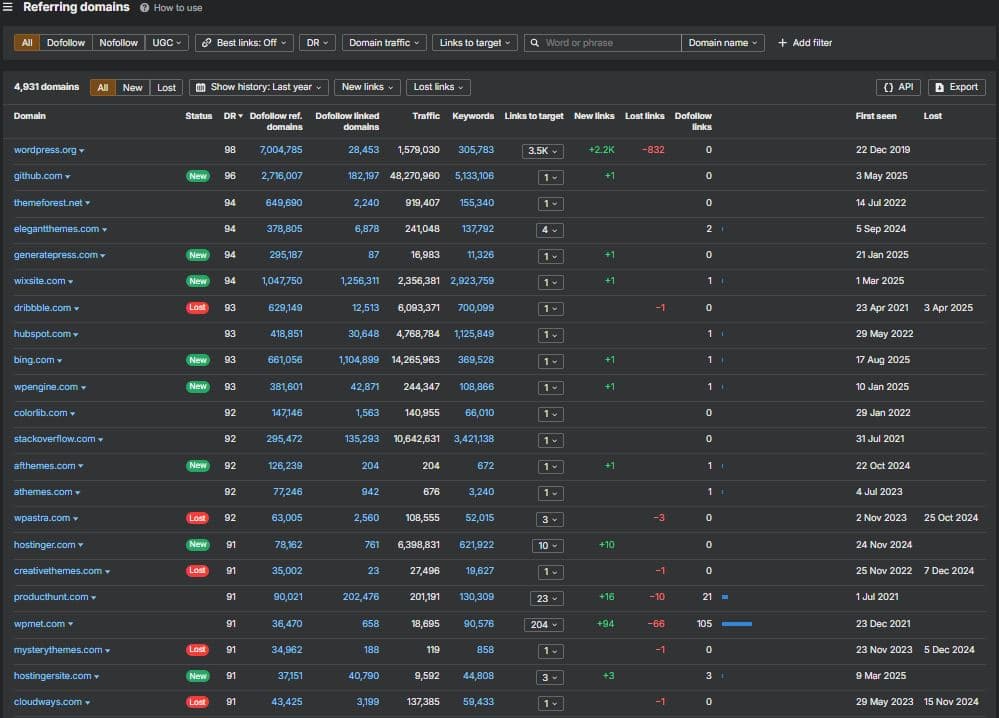
The referring-domain list of “WPXPO.com” includes heavyweights: wordpress.org, github.com, themeforest.net, elegantthemes.com, generatepress.com, hubspot.com, bing.com, wpengine.com, stackoverflow.com, producthunt.com, wpbeginner.com and others. On paper, that’s excellent. In practice, a few things undercut it.
The Anchors Are Noisy
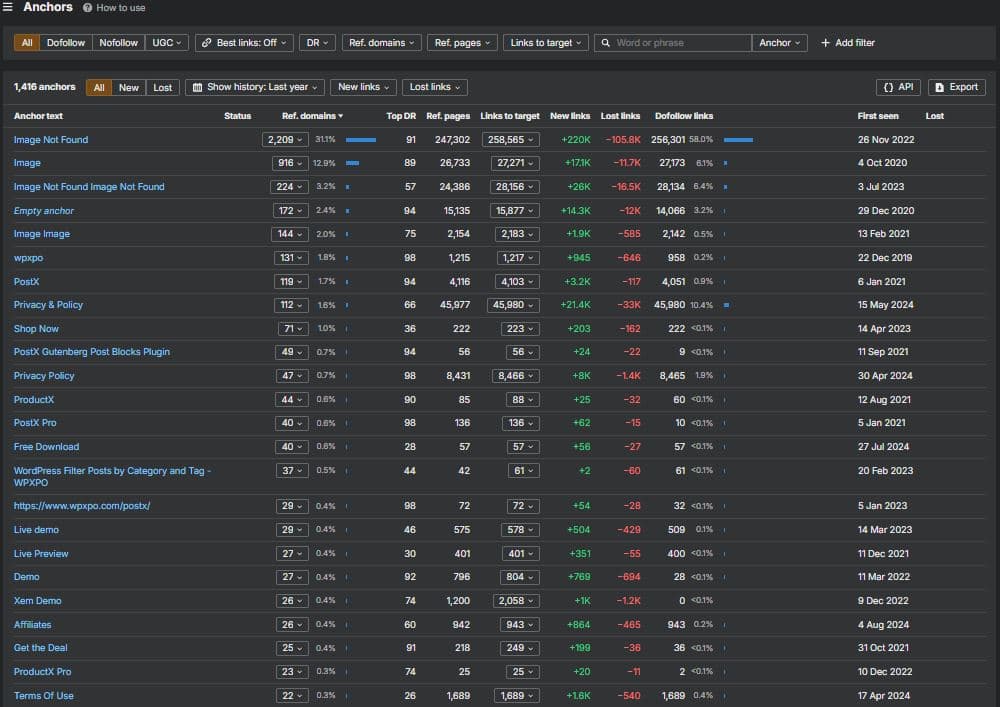
Your Anchors screenshot is packed with variants like “Image Not Found,” “Image,” “Empty anchor,” and even “Image Image.” Those typically come from:
-
Image hotlinking where the alt text is empty or boilerplate.
-
Theme or widget embeds that throw non-descriptive anchors.
-
Scraper sites copying assets and linking back with useless labels.
When anchor semantics collapse, Google sees lots of links but learns very little about topics. It’s authority without direction.
The “new” Referrers aren’t Always Helpful
-
wixsite.com shows as New in the Referring Domains panel. That domain often pops up because of free sites, hobby pages or scraper mirrors. Not toxic—just weak.
-
Lost marks on legit referrers (e.g., dribbble, creativethemes, wpastra) suggest either site redesigns dropped the links or showcases expired. If those were genuine mentions, I’d try to get them reinstated.
Sample I Jotted Down
Referring Domain
DR
Status
My read
wordpress.org
98
—
Plugin/theme listings; high trust, low anchor control.
generatepress.com
94
New
Fits the niche; good if contextually relevant.
wixsite.com
94
New
Usually low-value; monitor.
dribbble.com
93
Lost
If it was a product showcase, try to recover it.
hubspot.com
93
—
Keep healthy; probably doc/reference.
producthunt.com
91
—
Brand cred; minimal topical push.
Keywords & Pages: Brand-heavy, One off-Topic Post Doing the Heavy Lifting
The Site Structure and Top Pages panels make the traffic story simple.
What’s Actually Bringing People In?
-
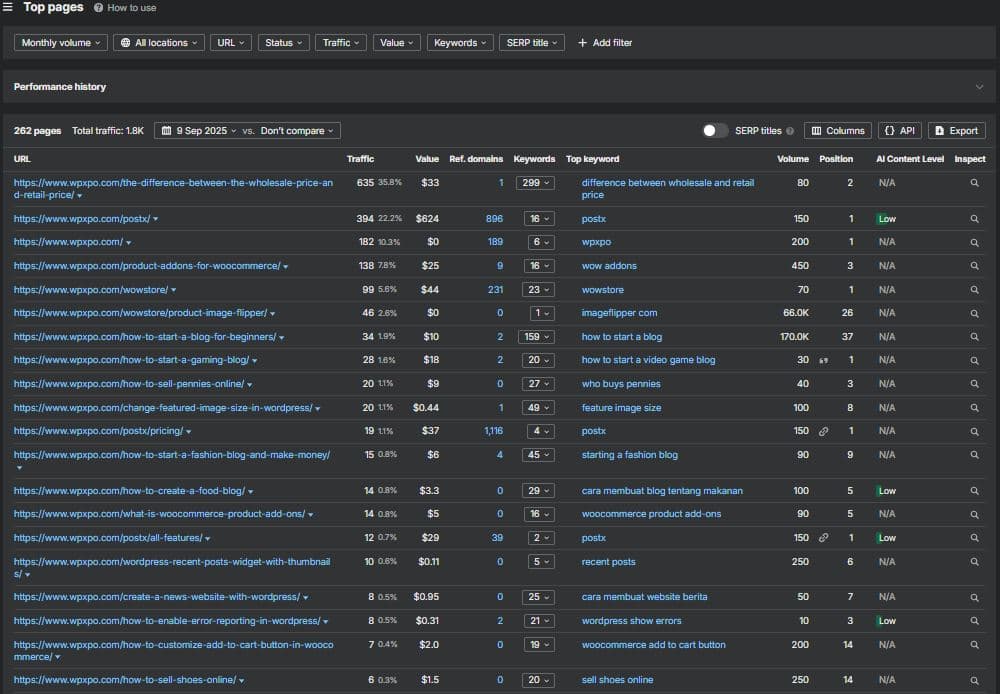
The homepage (WPXPO.com) carries the biggest chunk—expected.
-
A single explainer—/the-difference-between-the-wholesale-price-and-retail-price/—pulls ~635 visits a month, ranking around #2 on “difference between wholesale and retail price.” Useful post, sure, but not product-adjacent.
-
Brand hubs—/postx/ and /wowstore/—drive ~394 and ~150 visits respectively. Healthy for brand defense.
-
A key commercial page—/product-addons-for-woocommerce/—ranks around #3 for “wow addons.” That’s close to the money. Close isn’t cash.
The Odd Mismatch
- /postx/pricing/ shows ~1,116 referring domains in your structure shot… and only ~19 organic visits. That’s not normal for a reputable product page with a link moat. Red flags I’d check immediately:
-
Title/H1 weak or misaligned?
-
Competing /pricing clones causing duplication or messy canonicals?
-
**Page blocked from rich results (no FAQ/Product markup), killing CTR?
** -
Mobile issues depressing visibility on the very queries that matter?
-
Quick Table
URL
Est. Organic
Notable Keyword / Note
/
~1,810
Brand hub
/the-difference-between-the-wholesale-price-and-retail-price/
~635
“difference between wholesale and retail price”
/postx/
~394
“postx” (pos ~1)
/wowstore/
~150
“wowstore”
/product-addons-for-woocommerce/
~138
“wow addons” (pos ~3)
/postx/pricing/
~19
1,116 ref. domains but near-zero traffic
Technical & Mobile — Fast on Paper, Failing Where It Counts
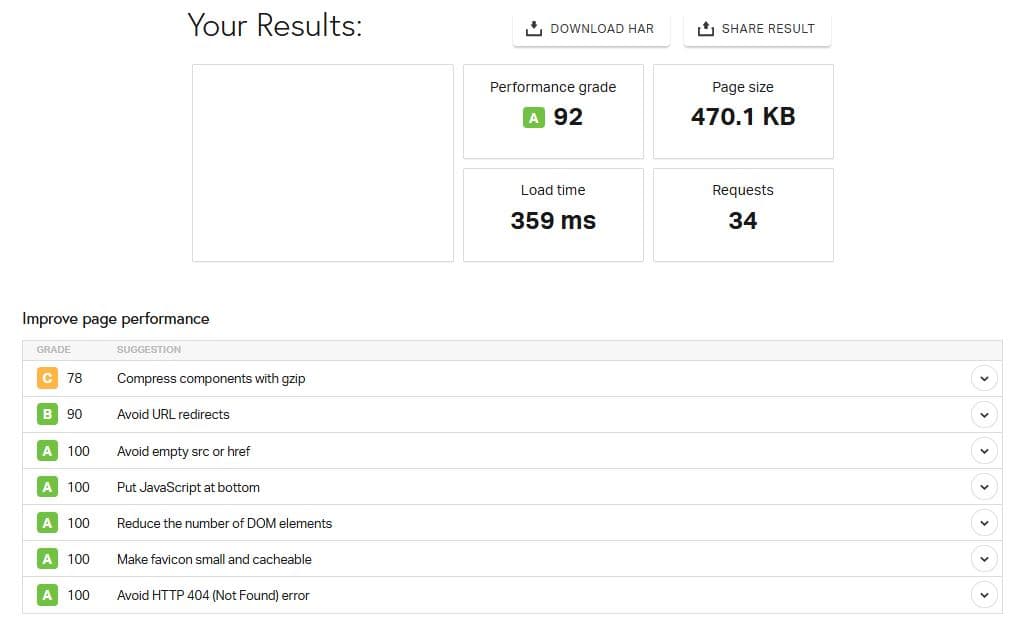
I’m staring at two conflicting signals. One speed test gives me an A 92, ~359 ms load, 470 KB, 34 requests. Clean. Then the bulk Mobile-Friendly check stamps the homepage with a red not mobile-friendly badge. Same site, same day.
Why can that happen:
-
Speed tests hit a single server with ideal conditions; Google’s mobile checks render with their stack and judge layout stability, viewport handling and tap targets.
-
A site can be quick yet still fail CLS (layout shifts), INP (slow interactions) or have something like a sticky bar that overlaps content.
What I See and What it Likely Means?
Signal
Likely Cause
Quick Test I’d Run
Mobile-Friendly: Fail on homepage
Sticky header/modals, off-screen nav pushing content, blocked CSS/JS during render
Lighthouse (mobile), Chrome DevTools → Layout Shift Regions
Pingdom-style speed: A 92, ~359 ms
Requests are optimized; payload is light
Compare field data (CrUX) to lab; check network waterfalls for late JS
robots.txt + sitemap: clean
Crawl not blocked
GSC Coverage and Page indexing → see what Google actually includes/excludes
I don’t have Core Web Vitals field data in the screenshots. That’s the piece that decides rankings pressure on mobile.
Content → Revenue — Move the Money Pages into the Sunlight
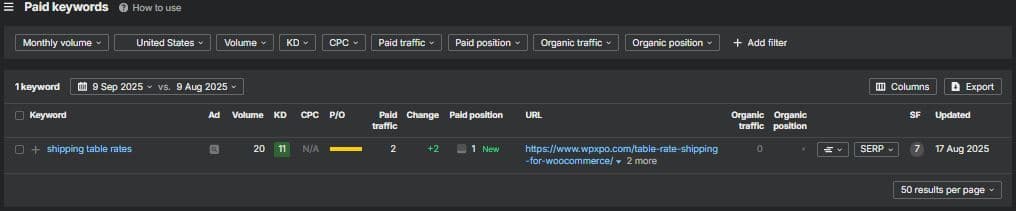
One explainer about wholesale vs retail does far too much heavy lifting. It’s not where the revenue lives. The pages that should rake in qualified clicks are underexposed or misaligned.
My short list of “money” pages to fix first
-
/product-addons-for-woocommerce/ — ranks around #3 for “wow addons.” Close.
-
/postx/ — strong brand defense; use it as a hub, not a cul-de-sac.
-
/wowstore/ — brand cluster; bake comparisons and migration notes into the template.
-
/postx/pricing/ — ~1,116 referring domains and barely any organic traffic. Something’s off.
Reality vs. What it Should Be?
Page
Est. Organic (shot)
Current Angle
What I’d Change Now
/product-addons-for-woocommerce/
~138
“wow addons” target
H1/Title tuned for “WooCommerce product add-ons”; add “X vs Y” tables, FAQs; Product schema; internal links from all “how-to” posts
/postx/pricing/
~19
thin traffic despite huge links
Check canonicals/noindex; add plan diff table, feature explainer blurbs (schema FAQ), pricing qualifiers (“lifetime?”, “site count?”); improve title to match how buyers search
/postx/
~394
brand hub
Convert to a decision hub: demos above the fold, feature clusters, “compare alternatives,” testimonials with dates; funnel links to pricing and features
/wowstore/
~150
brand hub
Same pattern: feature grid, integrations, migration guide and comparison blocks
Internal Links Are Your Cheapest Lever
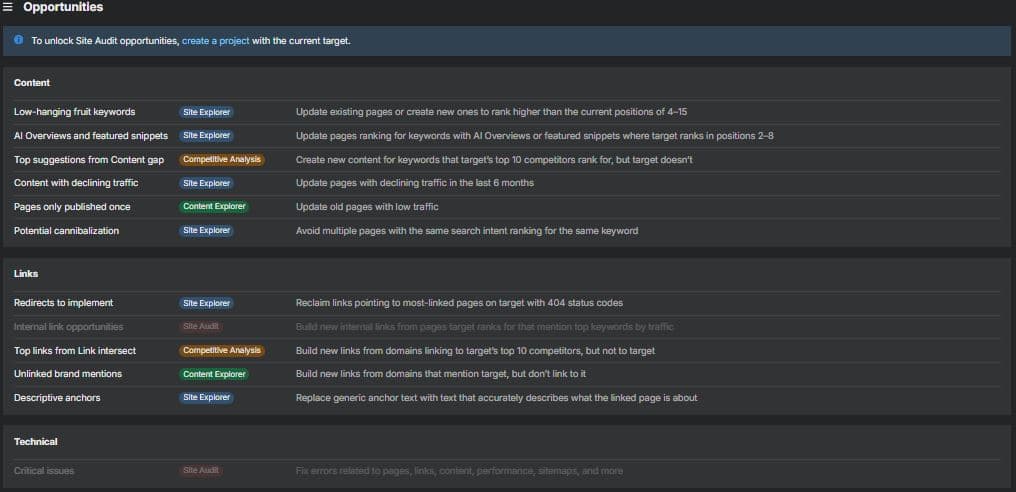
Every generic tutorial (how to start a blog, gaming blog, featured image size, error reporting) should give one clear, above-the-fold link to the most relevant product page and one mid-content contextual link to a feature page. Not three, not zero. Two. Predictable and crawlable.
Schema Where It Matters
-
Product on SKU pages (name, description, offers if applicable).
-
FAQ on pricing and comparison sections (shipping features, template limits, plan differences).
-
HowTo only where there’s an actual step sequence; don’t force it.
A Small On-Page Nudge with Outsized Returns
- “Pricing” is a weak title. Buyers search “Pricing & Plans,” “Pricing for [Product],” even “Lifetime vs annual.” I’d rewrite /postx/pricing/ to something like:
_**“PostX Pricing & Plans — Gutenberg Grid/News Blocks, Lifetime and Annual Options”
**_Then mirror those terms in the plan tiles and FAQ.
Country Splits & Intent Localization
Traffic splits in the screenshots say: US ~25%, India ~17%, Brazil ~11%, “Other” the rest. That’s a real mix. I don’t see localized pages or hreflang hints in what you shared.
This matters because the way people search for the same capability varies by region.
-
Shipping features: “table rate shipping” vs “rate tables,” “COD,” “GST vs VAT,” regional couriers.
-
Pricing trust: currency display, taxes included or not, refund policy phrasing that matches local expectations.
-
Docs: install guides for hosts popular in-region (Hostinger in LATAM, for instance).
Competitor Lens — What the SERP is Likely Telling Me?
I don’t trust tool scores alone. I pull the SERP and look at the shape of results: official WooCommerce extensions, long-standing plugin shops, neutral reviewers, marketplace pages and comparison posts. For “WooCommerce product add-ons,” “table rate shipping,” “weight based shipping” and “distance-based pricing,” the stack usually tilts toward vendors with deep docs, clean demos and clear pricing tables. When a brand is strong, I see it in three places at once: the product page, a comparison page and a doc page—each holding a slot.
What Do I Check on Page 1?
-
One vendor page with decisive intent (buy/compare), not a generic blog.
-
One neutral comparison capturing long-tail modifiers (“best add-ons for X”).
-
One documentation page ranking on a how-to variant (installation, config).
-
Presence of rich results (FAQ, Product).
-
Price language in snippets (currency, plan names).
If WPXPO is Absent or Weak, I react like this:
-
Build a single definitive product page per capability with comparison blocks.
-
Spin a “vs” explainer for the exact adjacent brands I see.
-
Promote docs to rankable articles where it makes sense; not everything stays buried in support.
Bottom line: if those three entry points don’t exist or aren’t targeted, rankings lag—even with a high DR. That’s why I doubt the footprint right now.
Tiny Checklist Table I Keep Next To Me
Query family
Do I see a buy page?
A neutral comparison?
A doc/how-to result?
Action if missing
Product add-ons
☐
☐
☐
Ship SKU page + “vs” + doc article
Table rate shipping
☐
☐
☐
Clarify page intent, add examples, FAQ
Weight-based shipping
☐
☐
☐
Consolidate thin posts → one hub
Distance-based pricing
☐
☐
☐
Add use-case demos + schema
Pricing Page Teardown — Too Many Links, too Little Search Power
That /postx/pricing/ figure—~1,116 referring domains with ~19 organic visits—keeps nagging me. Something mechanical is muting it. I run a standard pass on pages like this.
What I Test in Under an Hour:
-
Title/H1 alignment with buyer queries (not just “Pricing”).
-
Canonical points to itself; no stray cross-canonicals.
-
Indexable (no noindex, no blocked resources).
-
FAQ schema with the questions buyers actually type (lifetime/annual, site limits, refunds).
-
Plan names and feature labels that mirror what people search (grid, news blocks, Gutenberg, templates).
-
Currency and locale hints; even a soft indicator reduces bounce from non-US users.
-
Mobile CWV stability: no jumping headers, no pricing toggle that freezes input.
Triage Table
Check
What I usually find
What I’d change
Expected lift
Title/H1
“Pricing”
“PostX Pricing & Plans — Gutenberg Grid/News Blocks (Annual & Lifetime)”
+2–4% CTR on brand queries
Canonical
Wrong or missing
Self-canonical only
Restores eligibility
Index
Accidental noindex on variant
Remove, resubmit in GSC
Index within days
FAQ
None or generic
5–7 buyer FAQs, marked up
Rich results; higher CTR
Plan labels
Internal jargon
Phrase features like searchers do
Better snippet relevance
Mobile
CLS from sticky header
Reserve space, tame modals
Positions + stability
Verdict — Cautious, Not Condemning
Do I think the domain is illegitimate? No. The brand surfaces in the right ecosystems, the robots/sitemap are sane and the product footprint feels like a real operation.
Do I think the search footprint is overstated by raw link counts? Yes. The anchor pool is polluted with image/junk labels, the money pages don’t communicate buyer intent clearly and mobile signals are suspect. That combo explains the DR ~79 vs ~2–3K visits mismatch without invoking penalties or conspiracies.
What would flip my stance from skeptical to confident:
-
Mobile green across core templates (homepage, SKU, pricing) with CWV in the clear.
-
Pricing and SKU pages showing richer snippets and rising CTR on branded + commercial terms.
-
A cleaner anchor distribution (fewer “Image / Empty anchor” entries), plus a handful of fresh editorial links that actually describe the product.
-
Non-brand clicks growing quarter over quarter because buyers can find you on what they call the thing, not just what you call it.
Until those move, I treat the domain as solid tech with an underperforming search reality—not a scam, just a site that hasn’t aligned authority, semantics and intent.
Share
You may also like


Send me your site
I'll tell you honestly what's broken. If we can't help, I'll tell you who can.
Free · 45 min · no obligation